What Should I Expect When Changing MSPs? – Making the Smart Decision

What Should I Expect When Changing MSPs? – Making the Smart Decision

executives in a meeting room

Before signing with a new MSP, it’s important to assess your current situation and gather key details about your existing environment. Many organizations discover during onboarding that their previous MSP didn’t fully document systems, share access information, or communicate clearly about what services were being provided.

Your MSP is strategic to your business operation and change is always uncomfortable, so it is usually avoided whenever possible.  But resistance to changing MSPs can be a detriment to your business evolving.  Taking that next step to become a market leader, attract new customers, hire a great employee, all are activities that benefit from complementing, strategic, technology systems.  

If you are beginning to feel that your current MSP is inhibiting you from taking that necessary step to realize the full potential of your business, ask yourself these questions:

Do I receive regular reports and inventories?  Your MSP should provide periodic inventory reports, network diagrams, and health summaries. If you’ve never received them, it’s worth requesting a full list of all managed systems before you transition.

Do I understand the current services and billing?  Many businesses aren’t fully aware of what’s covered under their contract. Are you paying for cybersecurity monitoring, backups, and endpoint protection? Are there unexplained items on invoices? Clarify what you’re paying for now to avoid service gaps when you switch.

Has our MSP been transparent about access and information? A trustworthy MSP should provide you with administrative access, documentation, and system credentials. If they’ve held these closely, your new provider may face challenges gaining control of your environment.

Are we leasing or renting the IT hardware?  Some MSPs lease hardware — such as firewalls, servers, or desktops — as part of their service. It’s critical to know which assets belong to you and which belong to your provider, since these may need to be replaced or returned during the transition.

Do we routinely review procedural checklists?  Having shared documentation for tasks like onboarding new users, configuring endpoints, or provisioning accounts will make the changeover much smoother. If you don’t already have these checklists, your new MSP will likely create them as part of their onboarding process.

These questions not only prepare you for discussions to measure potential new provider(s), but they also help to identify potential risks or gaps that could delay onboarding when you decide it is time to make a switch.

Mileposts to Expect During a Change-Over

Switching MSPs is not a flip-of-a-switch event — it’s a structured process that typically unfolds over 30 to 60 days. During this period, both your old and new providers will need to coordinate to ensure business continuity.  Here’s what you can expect throughout the transition:

  • Kickoff and Recurring Meetings
    The new MSP will host a kickoff meeting to introduce the project team, outline the timeline, and set milestones. Expect to see a detailed roadmap that defines who’s responsible for each step.
  • Hardware, Software, and Credential Inventory
    Your new provider will inventory all servers, endpoints, network equipment, and applications. They’ll also review access credentials to confirm they have what’s needed to manage your systems.
  • Overlapping Support Period
    A smooth transition usually includes about 30 days of overlapping support, where your old MSP continues handling tickets while the new one begins taking over. This overlap helps avoid service interruptions during the handoff.
  • Backup Verification
    Before any major change, backups are tested and verified. This is critical — if something goes wrong during migration or toolset replacement, backups ensure data can be recovered quickly.
  • Transitional Introductions
    Expect to participate in several “three-way calls” between your current and new providers to clarify responsibilities, hand off access, and confirm completion of specific tasks.
  • Transfer of Administrative Access
    The new MSP will take over administrative accounts, while the outgoing provider’s access is restricted. Be aware that some outgoing MSPs may withhold certain credentials or procedural details. If this occurs, your new MSP will assist you in regaining control or rebuilding what’s missing.
  • Removal and Installation of Toolsets
    Each MSP uses its own management tools for monitoring, remote access, and endpoint protection. During onboarding, your new provider will remove the old toolsets and install their own agents and utilities on your servers and devices.
  • License and Subscription Transfers
    You may need to authorize the transfer of licenses or subscriptions, such as Microsoft 365, to your new MSP’s management. This includes updating the designated Cloud Solution Provider (CSP) or partner of record.
  • Training on Communication and Support Channels
    MSPs have their own processes for submitting support requests — by phone, email, or client portal. Early in the relationship, your new provider should train your team on how to reach them and what information to include in requests.
  • Activation of SLAs
    Once onboarding is complete, service level agreements (SLAs) go into effect. Response times and escalation paths should begin to normalize as the new MSP’s support systems take over.
  • Post-Cutover Health Checks
    After all systems are transitioned, your new MSP will perform health checks and audits to confirm that backups, security monitoring, and configurations are running correctly. These reviews ensure stability and compliance with your service plan.

Recommendations and Lessons Learned

As a leading Managed Service provider in central Pennsylvania, Morefield has successfully conducted many onboarding (and offboarding) projects for businesses across our service delivery area.  We have worked with all types of businesses under our MSP program including Healthcare, Accounting, Legal, Consulting, Financial, Engineering, Manufacturing, Logistics and Transportation.  Across this spectrum of experience, we have observed that organizations who approach MSP transitions thoughtfully tend to have the best outcomes. Here are some lessons we have learned from real-world onboarding projects:

lessons learned from working with MSPs

Clarify expectations early.  Before signing an agreement, review SLAs, escalation paths, and ticket workflows with your new MSP. Confirm how requests are prioritized and how after-hours support is handled to prevent frustration.

Request a complete IT asset inventory & documentation.  Your current MSP should deliver a comprehensive list of all devices, servers, and network components under management.  Technology documentation should also be shared such as up-to-date network diagrams, configuration backups, and environmental details.  This becomes foundational for ongoing monitoring and lifecycle planning and accelerate troubleshooting.

Secure your passwords and access details.  Request a copy of all system access credentials from your current MSP. If passwords are provider-specific, ask for them to be reset and shared securely with your organization and new MSP.

Plan for contingencies.  Even with careful planning, tool migrations or firewall changes can cause unexpected downtime. Ask your new provider to review their rollback plans and contingency steps prior to scheduling the work.

Verify backups.  Confirm all backup routines are operational and meet your retention | recovery goals. Backups are your last line of defense — never assume they’re running properly without verification.  It is not unusual and better to expect that your current backup solution will be replaced by the new MSP, often this decision is contingent on how it was managed.  

Confirm access revocation for the old provider.  At the end of onboarding, ensure the new MSP has revoked all access previously granted to the outgoing provider — including VPN credentials, admin accounts, and shared passwords.

Following these lessons learned will help to protect your organization, it’s data and ensure a seamless handoff to your new managed service partner.
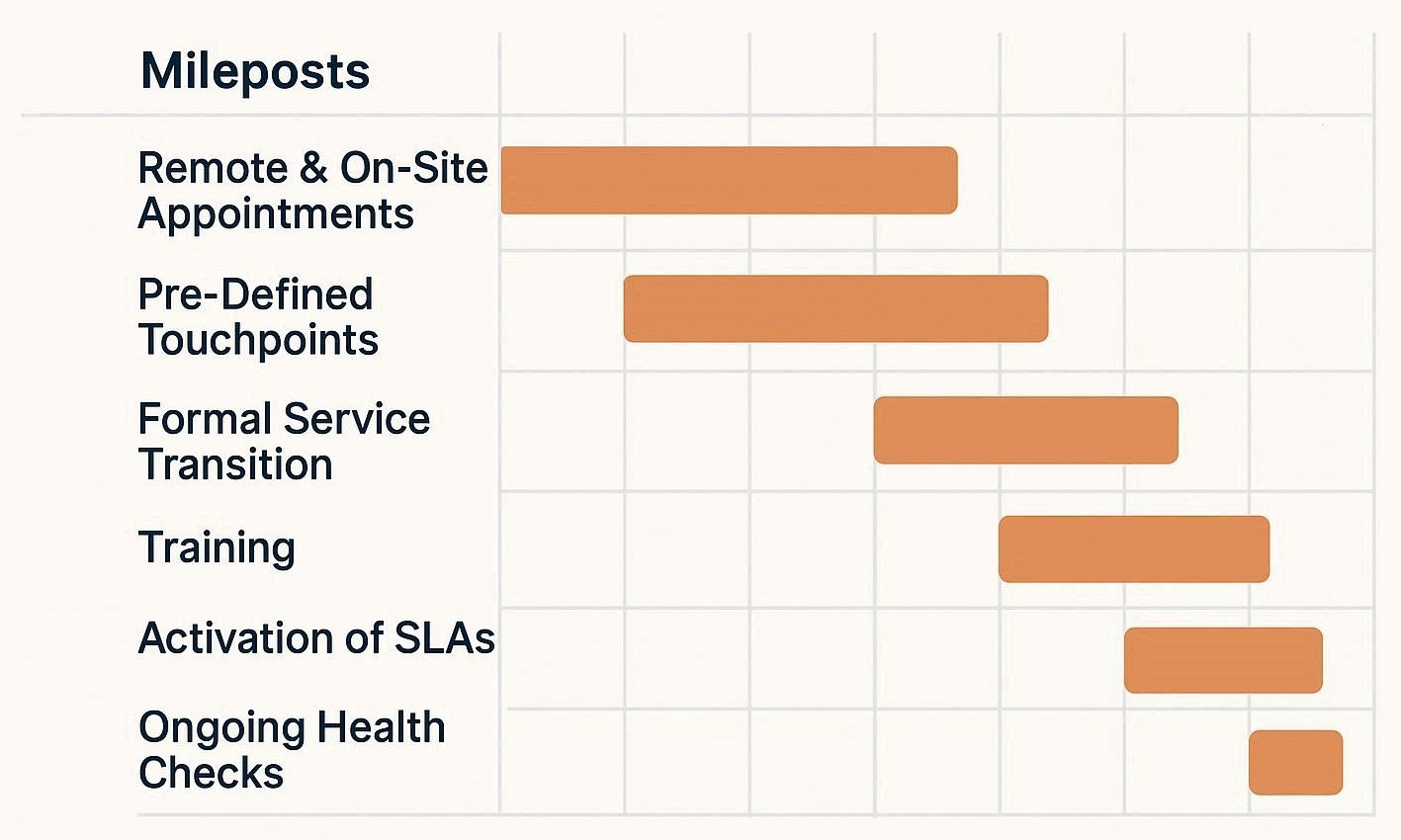
Gantt Chart mileposts

Inside Morefield’s MSP Onboarding Approach

At Morefield, we help central Pennsylvania businesses smoothly transition from one MSP to another. Whether we are welcoming them as a new customer to our Managed Program or supporting their decision to move on to their next MSP provider.  The key elements of our structured onboarding plan are designed to minimize disruption, ensure accountability, and deliver transparency at every step.

  • Structured Project Plan
    Every new client is assigned a dedicated project manager who serves as a single point of contact during onboarding. This ensures consistent communication and accountability.
  • Team-Based Execution
    We take a collaborative approach, engaging experts in infrastructure, cybersecurity, and end-user support to cover every technical aspect of your environment.
  • Remote & On-Site Appointments
    Our team performs a mix of remote and on-site activities to efficiently execute the onboarding plan and verify configurations firsthand.
  • Pre-Defined Touchpoints
    You’ll experience clear milestones and check-ins throughout the project, so you always know what’s happening and when.
  • Formal Service Transition
    Once onboarding is complete, there’s a structured handoff from the project team to our service delivery team, ensuring no detail is lost in the transition.
  • Training on Support Procedures
    We provide training on how to submit requests via phone, email, or portal — so your employees can confidently engage our Service Desk from day one.
  • Activation of SLAs and Normalized Response Times
    Once your systems are fully onboarded, our standard service levels go into effect, providing reliable response and resolution times.
  • Ongoing Health Checks and Audits
    Morefield continues to monitor your systems through scheduled appointments, health checks and audits to verify performance, stability, and compliance with your program.

Make a Confident Start With Your New MSP

Changing MSPs can feel daunting, but with the right plan, it’s an opportunity to gain greater visibility, better support, and stronger alignment with your business goals. By understanding what to expect — from early planning through final cut-over — you can set realistic expectations, avoid disruptions, and ensure your technology foundation is in capable hands.

A successful transition isn’t just about new tools or contracts; it’s about establishing a relationship built on trust, transparency, and proactive service. With a structured approach like Morefield’s, you can make the change with confidence and look forward to a more strategic, responsive IT experience.  When you are ready to learn more about the many benefits of Morefield’s Managed Service Program, contact us.


Skeptical By Design – Stop Trusting and Start Verifying

Contributing Author:  Allan Jacks, Morefield vCISO

October is Cybersecurity Awareness Month – a time to sip a pumpkin spice latte and reflect on how we protect our digital lives. It’s also a time to reassess and reinforce our defenses, spotlighting the role each of us plays in cybersecurity, and protecting our digital lives. While firewalls, antivirus software, and encryption are critical tools, the most powerful defense isn’t a piece of technology; it’s you.

The phrase “Trust but verify” comes from the Russian proverb “Doveryai, no proveryai” (Доверяй, но проверяй), which literally translates to “trust, but verify.” It was popularized by U.S. President Ronald Reagan during nuclear disarmament talks with the Soviet Union in the 1980s. It’s the idea that a responsible person verifies everything before committing themselves to act, even if it’s with a trusted individual.

This concept evolved into a formal cybersecurity framework known as Zero Trust, adopted by the U.S. federal government to address modern threats.

Zero Trust Architecture

“Zero Trust (ZT) is the term for an evolving set of cybersecurity paradigms that move defenses from static, network-based perimeters to focus on users, assets, and resources.” You can read more about the approach under NIST Special Publication 800-207 – Zero Trust Architecture here.  

The phrase has since been adopted in various contexts, including that of cybersecurity, where blind trust can be exploited and verification is essential for resilience. This means understanding who every user is within your environment, and what endpoint they are coming from, and includes devices within a trusted network behind the firewall. 

The reality is that trust can be a huge vulnerability. In today’s hyper-connected world, every individual is a potential target – and a potential defender. That’s why the mantra “Do Not Trust but Verify” isn’t just for IT Professionals. It’s a mindset every person should adopt to become a human firewall –a vigilant, informed defender against digital threats.

For individuals, this means

  • Questioning unexpected messages – even from known contacts.
  • Verifying links, attachments, and requests before clicking or responding.
  • Being skeptical of urgency, fear tactics, or too good to be true offers.

Trust nothing blindly. Verify everything.

Why You Matter More Than Ever

Cybercriminals know that humans – not machines – are often the weakest link. That’s why phishing, social engineering, and impersonation attacks are so effective. But when individuals are trained, aware, and vigilant, they become the strongest line of defense.

You are the human firewall when you

  • Pause before clicking a suspicious link. 
  • Report a phishing email instead of ignoring it.
  • Use strong, unique passwords and enable multi-factor authentication (MFA) wherever possible.
  • Keep your software and devices up to date with patches.
  • Speak up when something feels ‘off’

Good Habits to Verify Before You Trust – Working With a Zero Trust Mindset

Imagine receiving an email from your boss asking you to buy gift cards urgently. It looks legitimate – but something doesn’t feel quite right. Pause, verify the sender’s email address, then call or text your boss. It turns out it was a phishing attempt. Your vigilance just saved your company from fraud.  Additional best practices to adopt 

Email and Messaging

  • Hover over links to check their destination.
  • Confirm unusual requests via a separate channel (calling or texting the sender).
  • Be wary of any attachments from unknown or unexpected sources

Passwords and Authentication

  • Use a password manager to generate and store strong passwords.
  • Turn on multi-factor authentication (MFA) wherever possible
  • Never reuse passwords across accounts, including those used in your personal life and within your accounts in your work life.

Social Media and Public Sharing

  • Avoid oversharing personal details that could be used for impersonation.
  • Be cautious of friend requests or messages from unfamiliar profiles.
  • Don’t click on viral links without checking their source.

Software and devices

  • Update applications and operating systems on a regular basis.
  • Only download software from trusted sources.
  • Use Antivirus and endpoint protection tools.

This October commit to being a human firewall. Share tips with friends and family. Encourage your workplace to complete cybersecurity training.

Key Moments to Share With Your Co-workers, Family, Friends

  1. Trust is exploitable, but verification is defensible.
  2. Verification doesn’t rely on assumptions but demands proof. Verification creates an audit trail and accountability, and applies access controls based on real-time context. Verification is not about paranoia. It allows organizations and individuals to say “We didn’t just trust – but we also checked. 
  3. Trust is a feeling. Verification is a strategy.

The key is balance – security must be strong, but seamless. Organizations must invest in user-friendly verification tools like single sign-on (SSO), adaptive authentication, and behavioral analytics.

Is it time? Implement Zero Trust Into Your Company Culture with Morefield’s Expert Guidance

The time to shift from “trust” to “verify” is now. While trust is essential for collaboration, blind trust is a vulnerability. Verification isn’t about suspicion – it’s about responsibility.

By adopting Zero Trust principles, individuals and organizations can protect data, systems, and people without sacrificing agility. The cost of inaction is too high, and the tools to verify are more accessible than ever.

Cybersecurity Awareness Month is a reminder that vigilance is not optional – it’s foundational. The phrase “trust but verify” served us well in simpler times. But today, verification must come first. Trust should be earned, not assumed. As threats grow more sophisticated, our defenses must grow smarter. It’s time to stop trusting – and start verifying.  

Is Zero Trust right for your organization, but you are unsure of how to get started?  Morefield’s experts can advise you on the best options and optimize the solutions that best align with your business. Contact us to learn more about our Cybersecurity services and how we can help you adopt Zero Trust within your Company today.


Smarter Communication — AI-Powered Solutions for Enhanced Collaboration

collaborating with coworkers using AI

As artificial intelligence elevates daily operations, taking advantage of its capabilities is one of the best ways to stay ahead of the curve in business. Using AI for answering customer service calls and optimizing team meetings can enhance collaboration, boost efficiency, save money and keep your customers happy.

How AI Enhances Collaboration on Team Calls

AI can enhance your company’s unified communications or VoIP system in the following ways.

Preparation

Calls are smoother and more productive when your team reviews progress, goals and specific discussion points. AI can use machine learning to summarize recent documents, emails, tickets and decisions. Each employee on the call should have enough advance notice to prepare their ideas and talking points, helping your team develop plans and reach resolutions faster.

Real-Time Knowledge Assist

An AI-powered call system can pull relevant documents, runbooks, policies and past decisions as various topics arise. It acts as a virtual assistant, delivering the information your team needs to collaborate effectively and reach decisions promptly. If necessary, AI can also find an expert for you and add them to the call with a quick summary.

Captions and Translation

Ensure every team member on the call can easily access and understand the conversation with real-time translation and captions. AI can translate calls in real time, providing captions for multilingual teams to ensure everyone has the necessary information to contribute to the conversation and move decisions forward.

Analytics for Balanced Participation and Increased Teamwork

AI can improve teamwork with analytics and inclusivity. Talk-time analytics report how much each team member contributes to the call, providing gentle nudges to encourage balanced participation. An AI-powered system can also search glossary terms on demand and clarify jargon or acronyms, ensuring everyone understands discussion points and remains aligned throughout the conversation.

Greater Alignment and Outcomes

Follow-up outreach after a call is vital for reaching desired outcomes. AI can keep your team on the same page across channels with call summaries that link directly to communication channels such as project tickets, emails and chat threads. It can also send transcripts, summaries and suggested replies to employees who couldn’t be on the call. With cross-meeting memory capabilities, an AI-powered system can highlight team decisions and where you document them.

AI automatically captures deadlines and necessary actions, pushing tasks to your customer relationship management system and various project management software tools. Your team will organize and track tasks, reaching goals faster so you can meet deadlines on time.

Analytics and Coaching

AI-powered analytics identify trends, meeting load insights and follow-through rates by team or project. An AI-powered system can also act as a private coach, providing clarity tips, identifying filler words and reminding you when to mention all stakeholders in a call.

How AI Is Changing Customer Call Answering

AI can also enhance your customer call answering processes, freeing your team to collaborate and focus on other high-value tasks. Traditional customer service methods involve long wait times and inconsistent information, which can frustrate customers. AI-powered communication solutions offer the following capabilities.

Human-Like Automated Call Answering

Though traditional menu-driven systems often confuse and annoy callers, AI provides a more conversational experience. ML and natural language processing capabilities personalize interactions and meet customer needs faster by responding to questions and statements the way a human might.

Instead of listening to a list of options, customers can talk to an AI system like it’s a real person. If necessary, an AI-powered system can also route calls to human agents with a summary of the customers’ needs and data.

Internal Company Data Crawling for Formulated, Accurate Replies

If you want to help more customers with your automated call system, you need AI customer service tools that use company data to learn about your business and callers’ needs. AI systems can crawl your internal information to formulate relevant, accurate replies and do the following:

  • Identify trends and common pain points customers experience
  • Automate routine queries
  • Increase first-contact automated call resolutions
  • Allow customers to reach the answers and resolutions they need faster

Benefits of AI in Phone Systems

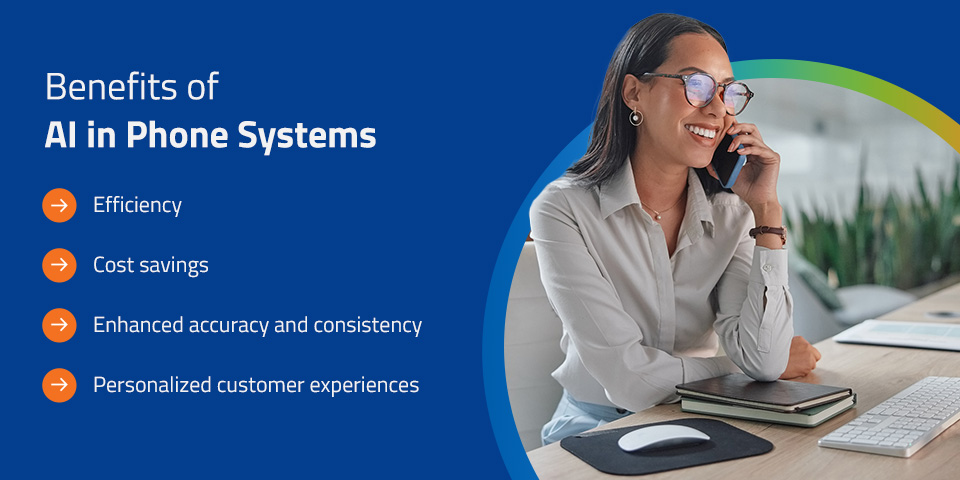
benefits of ai in phone systems

Implementing AI in your team calls and automated customer call systems offers the following advantages.

  • Efficiency: AI helps people solve challenges, share information, make vital decisions, complete tasks and serve customers faster. With AI, your team can be more productive and reserve more time for critical tasks.
  • Cost savings: An AI-powered system reduces operational costs through automation, so you can allocate your resources more efficiently.
  • Enhanced accuracy and consistency: Using AI enhances accuracy, providing consistent information based on your company’s internal data. You can make more informed decisions on team calls, while providing your customers with correct information and valuable solutions. AI also reduces the risk of human error when gathering and delivering information.
  • Personalized customer experiences: AI tailors responses based on customer data and history, increasing customer satisfaction with each service call.

Addressing Concerns and Challenges

As AI advances in technologies and industries, it’s understandable to feel unsure about the changes it may bring. However, embracing AI is one of the best steps you can take toward advancement and outperforming your competition. Here’s how to address typical worries about AI within your company or organization.

Job Security

While many people worry that AI might replace them, it’s more realistic to view technology as a tool that enhances your team’s capabilities — not one that takes their place. AI creates new job opportunities daily. For instance, we’ll need skilled professionals to optimize AI-powered systems and ensure they continue running effectively and ethically.

Data Privacy

Protecting company and customer data is essential, and it helps you comply with regulations such as the General Data Protection Regulation, the Health Insurance Portability and Accountability Act and the Gramm-Leach-Bliley Act. Advanced measures such as encryption and anonymization ensure information remains private when you use AI in your operations.

Human Connection

Human empathy is crucial in customer service interactions and team meetings. AI gives your team more time to focus on sensitive or complex matters, handling repetitive customer experiences so you can prioritize customers with more significant needs.

How to Implement AI in Customer Service and Collaboration Efforts

Here’s a quick checklist to optimize AI for your company’s collaboration and customer service targets.

  • Identify repetitive and complex tasks: Before implementing AI, differentiate between rote responsibilities and challenging ones that require critical thinking and human interaction.
  • Choose compatible tools: Choose AI communication tools that integrate seamlessly with your existing systems and programs.
  • Implement cybersecurity measures: Install and maintain robust cybersecurity measures to ensure reliable data protection and regulatory compliance.

Implement AI Into Your Collaboration and Customer Service Processes With Morefield’s Expert Guidance

implement Ai into your phone system and customer service with morefield

AI can significantly improve your team’s collaboration and customer service, but it requires thoughtful implementation. Morefield can enhance your customer service and unified communication or VoIP communication systems with advanced AI technology.

Our experts will advise you on the best options and optimize solutions to meet your precise needs and maintain regulatory compliance. Contact us to learn more about our services and how we can help you collaborate and meet customer needs effectively.

Why Insider Risk Now Includes AI

AI as a tool

Contributing Author:  Allan Jacks, Morefield vCISO

October marks Cybersecurity Awareness Month. A time when organizations, governments, and individuals spotlight the evolving threats in our digital world. As technology advances at what seems a breakneck speed, so too do the risks that lurk beneath the surface like how we must rethink traditional security models to confront new and emerging challenges.

One persistent and complex threat has always been that of insider risks where the danger posed by individuals within an organization who have access to sensitive systems and data. These risks can be malicious, like data theft, or accidental, like a misdirected email containing confidential information. Historically, insider risk has focused on human actors which include employees, contractors, and vendors.

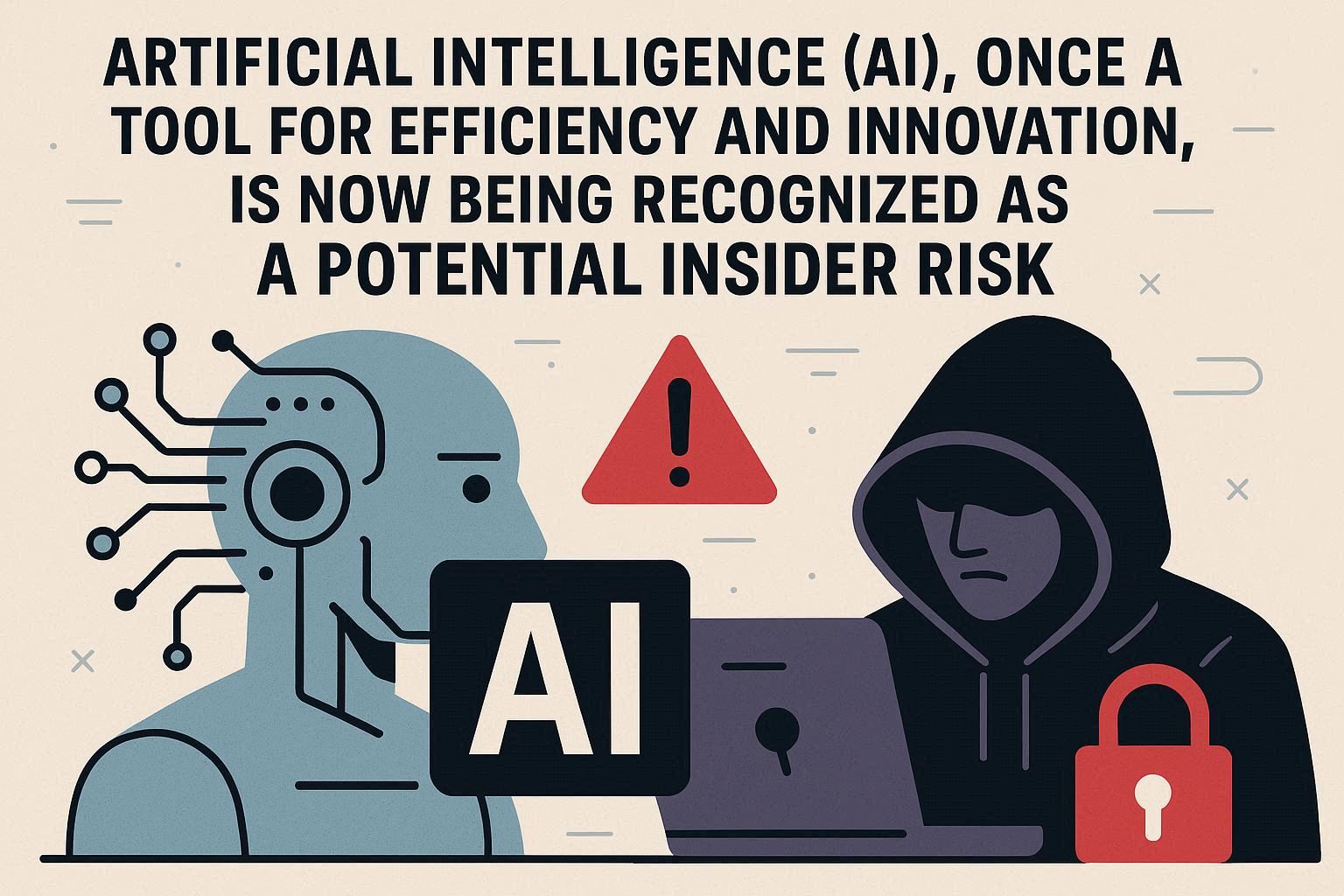
But today, a new kind of insider is emerging. Artificial Intelligence (AI), once a tool for efficiency and innovation, is now being recognized as a potential insider risk. With the possibility of access to vast amounts of data, making autonomous decisions, and increased integration into critical workflows, AI systems are beginning to occupy roles once reserved for trusted employees. With that shift comes a new set of vulnerabilities.

Historically, insider risk has referred to threats posed by people within an organization who have legitimate access to systems and data. These include:

  • Employees: Whether malicious or negligent, staff members can leak data, misuse credentials, or fall victim to phishing attacks.
  • Contractors: Temporary workers often have access to sensitive systems but may lack full training or oversight.
  • Vendors and third-party partners: External collaborators with system access can introduce vulnerabilities or be targeted by attackers.

AI systems are becoming even more integrated and now embedded in:

  • Decision-making processes (e.g., fraud detection, hiring, loan approvals)
  • Data analysis pipelines
  • Customer service and communication tools

These systems can act independently, interact with sensitive data, and even influence important business outcomes, making them functionally equivalent to insiders.

AI systems share several key characteristics with traditional insiders:

Privileged Access

  • AI tools often have direct access to sensitive databases, internal APIs, and customer information.
  • May be integrated into core business systems with broad permissions, making them high-value targets.

Autonomous Decision-Making

  • AI models can make decisions without human oversight, such as approving transactions or flagging suspicious behavior.
  • These decisions can have real-world consequences -especially if the model is biased, outdated, or trained on flawed data.

Manipulation and Misconfiguration

  • AI systems can be manipulated via adversarial inputs (e.g., prompt injection, data poisoning).
  • Misconfigured models may expose data, behave unpredictably, or violate compliance standards.
  • Lack of transparency in AI decision-making (it’s a black box) makes it harder to detect when something goes wrong.

As AI becomes more embedded in business operations, it must be treated not just as a tool – but also as a potential insider. Organizations need to extend their insider risk programs to include AI governance, access controls, and continuous monitoring of autonomous systems.  Cybersecurity isn’t just about keeping people honest anymore, but also about keeping machines accountable.


How Ai is a risk

How AI Can Become a Risk

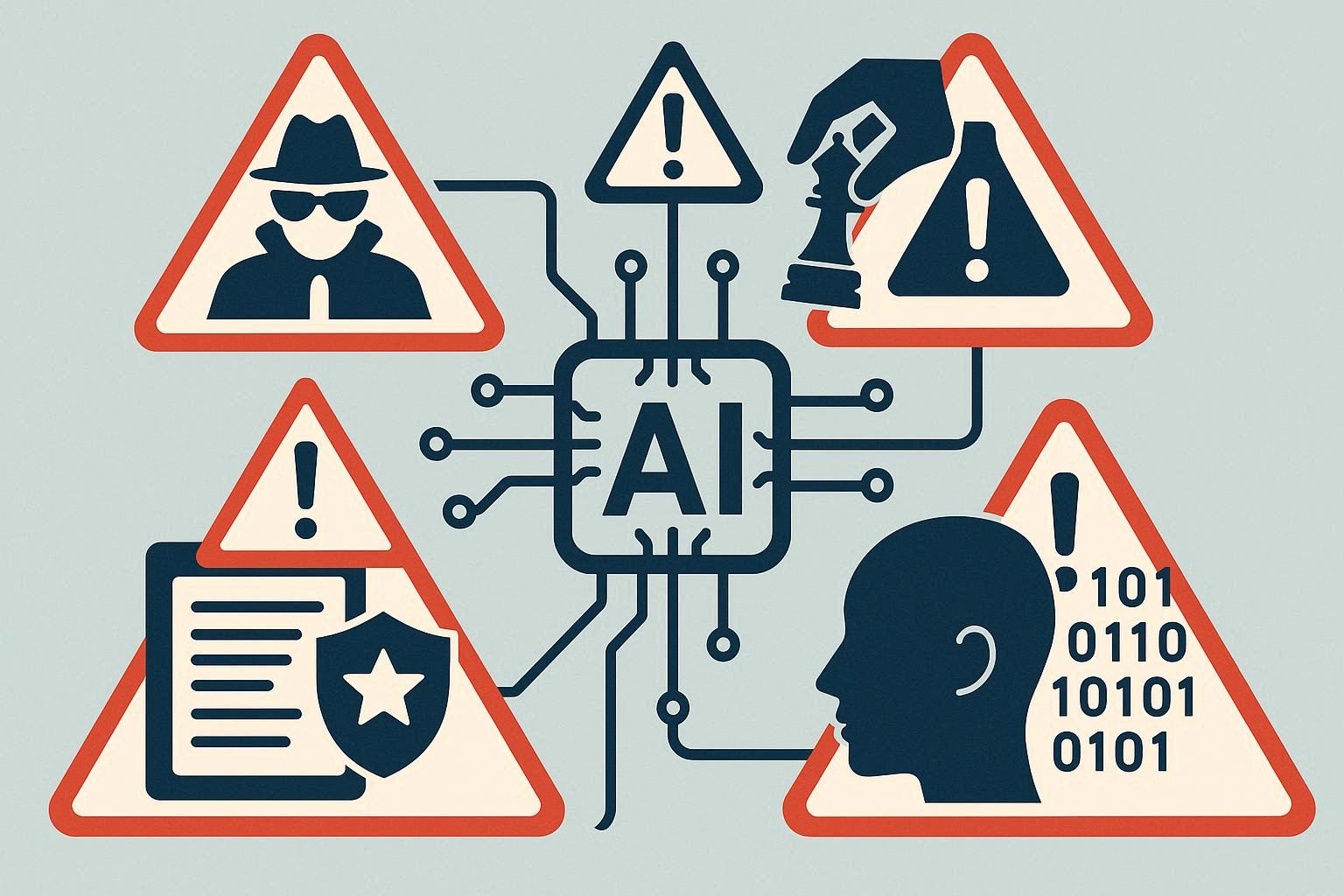
As artificial intelligence becomes deeply embedded in business operations, it introduces new dimensions of risk—some familiar, others entirely novel. While AI promises efficiency, insight, and automation, it also opens doors to misuse, manipulation, and unintended exposure which can include the following.

Misuse by Insiders

  • Employees leveraging generative AI tools (like chatbots or code assistants) may inadvertently or deliberately input sensitive data which may include customer records, proprietary code, or internal documents – into public-facing models.
  • These tools often retain or process inputs in ways that are opaque, raising concerns about data leakage, IP exposure, and compliance violations.

Prompt Injection Attacks

  • AI models, especially large language models, are vulnerable to prompt injection, where malicious users disguise malicious inputs as legitimate prompts, manipulating the model’s behavior.
  • This can lead to unauthorized access, data exfiltration, or the AI performing unintended actions, turning a helpful assistant into a security liability.

Autonomous Decision-Making Risks

  • If an AI system is trained on flawed, biased, or outdated data this may influence risky decisions -such as approving fraudulent transactions or misclassifying threats.
  • These decisions often occur without human oversight, making it difficult to detect or reverse errors in real time.

Unintended Data Exposure via Automation

  • AI-driven workflows can automatically share, process, or store data across systems.
  • Without proper guardrails, this can result in accidental exposure, such as sending sensitive files to the wrong recipient or publishing internal content externally.

Third-Party AI Integrations

  • Many organizations embed vendor AI tools into their internal systems – CRM platforms, HR software, analytics engines.
  • These tools may have access to sensitive data but lack transparency in how they store, process, or secure it.

 Lack of Visibility and Control

  • External AI models often operate as black boxes, making it hard to audit decisions, track data flows, or ensure compliance.
  • Organizations may not know:
    • Where the data goes.
    • How long it’s retained.
    • Whether it’s used to train future models.

AI isn’t just a tool—it’s a new kind of insider. It can be trusted with sensitive data, make autonomous decisions, and interact with external systems. But without proper governance, it can also be exploited, misconfigured, or manipulated, posing serious risks to security, privacy, and compliance.

Organizations must treat AI with the same scrutiny they apply to human insiders: access controls, monitoring, training, and accountability.

Case Studies and Real-World Examples

Samsung Data Leak via ChatGPT (May 2023)

Samsung employees accidentally leaked sensitive company information while using ChatGPT for help at work, including source code and a recording of a meeting. The incidents raised concerns about the potential for similar leaks and possible violations of GDPR compliance. Samsung has taken immediate action by limiting the ChatGPT upload capacity and considering building its own internal AI chatbot to prevent future leaks. (www.cybernews.com)

  • Risk Type: Employee misuse of AI
  • Lesson learned: Generative AI tools can retain or process sensitive inputs, creating data exposure risks.

Chevrolet Chatbot Manipulation (December 2023)

A prankster tricked a Chevrolet dealership’s AI chatbot into offering a $76,000 Tahoe for just $1. The chatbot was manipulated through clever prompts, revealing how easily customer-facing AI tools can be exploited. The Tahoe was never delivered. (www.cybernews.com)

  • Risk Type: Prompt injection and manipulation
  • Lesson learned: AI systems with public interfaces can be gamed, leading to reputational and financial damage.

Air Canada Refund Incident (February 2024)

In February 2024, Air Canada faced a significant controversy after a grieving passenger, Jake Moffatt, sought a refund for a full-price ticket purchased due to misinformation from an airline chatbot. The chatbot incorrectly advised Moffatt to book a flight immediately and request a refund within 90 days, which contradicted Air Canada’s bereavement travel policy. The Canada’s Civil Resolution Tribunal ruled in Moffatt’s favor, ordering Air Canada to provide a partial refund of approximately $812 CAD. The tribunal found that Air Canada failed to adequately explain the chatbot’s misleading information, which led to the passenger’s decision to pursue legal action.

  • Risk Type: Autonomous decision-making error
  • Lesson learned: AI-driven workflows can make costly mistakes if not properly monitored.

Google Bard Misinformation Incident (February 2023)

During a public demo, Google’s Bard chatbot provided incorrect information about the James Webb Space Telescope. The error led to a drop in Google’s stock and raised concerns about the reliability of AI-generated content.

  • Risk Type: AI misinformation
  • Lesson learned: AI systems can undermine credibility and trust when they operate without sufficient validation.

Third-Party AI Integration Risks

Some companies integrate external AI tools into internal systems without full visibility into how those tools handle sensitive data. These integrations can introduce vulnerabilities if the vendor’s security practices are weak or opaque.

  • Risk Type: Vendor AI misuse or misconfiguration
  • Lesson learned: Lack of transparency in third-party AI models can lead to data leakage and compliance violations.

Why These Cases Matter

These incidents show that AI systems:

  • Can be misused by insiders, intentionally or accidentally.
  • Are vulnerable to manipulation through prompt injection or adversarial inputs.
  • Make autonomous decisions that may be flawed or risky.
  • Often operate with privileged access to sensitive data.
  • May be embedded in workflows with limited oversight or visibility.

In short, AI now behaves like a digital insider—one that must be governed, monitored, and secured just like human employees.

Mitigation Strategies

As AI systems become embedded in core business functions, they must be treated with the same scrutiny as human insiders. Mitigating AI-related insider risk requires a blend of technical controls, governance frameworks, and cultural awareness. Here’s how organizations can stay ahead:

Treat AI Systems as Privileged Users

  • Assign AI tools role-based access controls just like human employees.
  • Limit access to sensitive data and systems based on the AI’s function.
  • Monitor and log AI activity to ensure accountability and traceability.

Monitor and Audit AI Behavior

  • Implement continuous monitoring of AI decisions, outputs, and interactions.
  • Use anomaly detection to flag unusual behavior – such as accessing unexpected datasets or generating risky outputs.
  • Maintain audit trails for AI-driven actions to support compliance and incident response.

Validate Training Data and Model Outputs

  • Ensure AI models are trained on clean, unbiased, and secure data.
  • Regularly test outputs for accuracy, fairness, and security implications.
  • Use human-in-the-loop systems for high-stakes decisions to reduce risk.

Vet Third-Party AI Tools Thoroughly

  • Conduct security assessments of vendor AI solutions before integration.
  • Require transparency on how external models handle, store, and process data.
  • Include AI-specific clauses in vendor contracts covering data protection and incident response.

Control Generative AI Usage

  • Establish clear policies on what data can be shared with generative AI tools (e.g., ChatGPT, Bard).
  • Use enterprise-grade AI platforms with data governance features.
  • Educate employees on the risks of inputting sensitive information into public models.

Update Insider Risk Programs

  • Expand insider risk frameworks to include non-human agents like AI.
  • Train security teams to recognize and respond to AI-related threats.
  • Align policies with evolving standards from NIST, ISO, and industry-specific regulators.

Foster a Culture of Responsible AI Use

  • Promote AI literacy across the organization.
  • Encourage ethical use of AI through training, awareness campaigns, and leadership modeling.
  • Make AI governance part of your cybersecurity culture—not just a technical checklist.

AI the New Insider: Redefining Risk in the Era of Intelligent Systems

As organizations embrace artificial intelligence to drive efficiency, innovation, and scale, they must also confront a new reality: AI is no longer just a tool – it’s an operational insider. With access to sensitive data, the ability to make autonomous decisions, and increasing integration into critical workflows, AI systems now occupy roles once reserved for trusted employees.

This shift demands a redefinition of insider risk. No longer limited to employees, contractors, or vendors, insider threats now include non-human agents capable of causing harm through misuse, manipulation, or misconfiguration. From generative AI leaking confidential data to third-party models operating as opaque black boxes, the risks are real – and growing.

Cybersecurity strategies must evolve to meet this challenge. That means extending governance frameworks, updating access controls, and fostering a culture of responsible AI use. It also means recognizing that the very systems designed to protect us can become threats if left unchecked.

As we mark October as Cybersecurity Awareness Month, now is the time to take a closer look at how your organization is managing AI-driven risks. Contact Morefield today to assess whether your current cybersecurity framework, data policies, and access controls are ready for this new era. A proactive conversation today can help ensure your AI tools remain trusted allies—not unexpected threats—to your business tomorrow.

Reimagining Business Collaboration in the Era of AI

reimagine biz collab ai

If your organization relies on a premise-based telephone system, now is the time to explore your options, whether a phased migration, upgrading, or switching to Cloud | Hosted solutions.  To help clarify what this means for your organization—costs, timelines, and available paths on October 7th, Morefield along with our partner Ring Central hosted a live webinar allowing the audience to ask questions, to make an informed decision for their business.  If you missed the webinar, you can check out the recording here.  Or, continuing reading as we recap the points covered in the 50-minute webinar.

Why Morefield & RingCentral are prepared for the Future

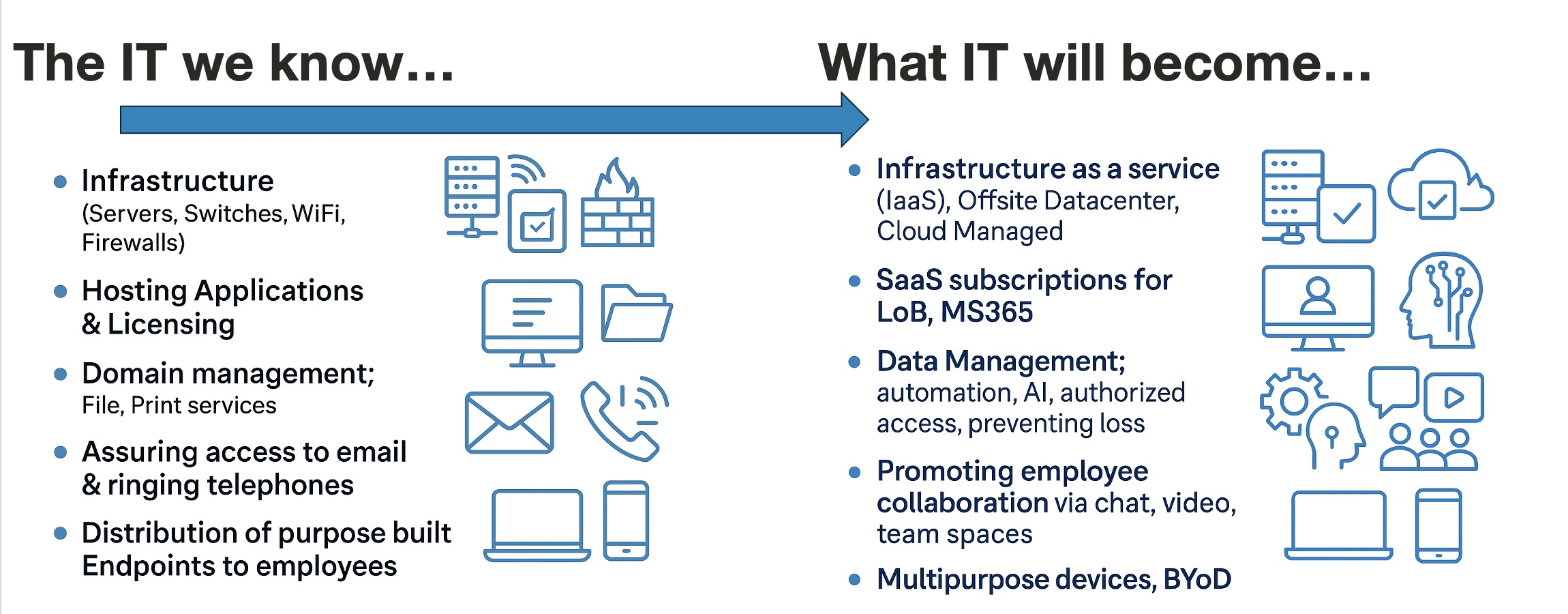
Transformation of IT

In 2025, hosted voice solutions like RingCentral have become one of the top technology investments for businesses—alongside infrastructure and cybersecurity. Yet, many organizations still rely on legacy, premises-based phone systems as they evaluate whether these modern platforms are the right fit. For more than a decade, Morefield has recommended RingCentral as a cornerstone of digital evolution—not just as a replacement for ringing telephones, but as a transformational platform that can enhance communication, employee collaboration, and customer engagement. 

The Big Picture: AI-First Experiences

RingCentral is more than a communication platform—it’s an AI-first foundation for a modern workplace. The mission is to create meaningful experiences for both customers and employees by delivering intelligent, connected, and effortless business first solutions. These experiences are powered by real-time AI, unified across voice, video, messaging, and customer experience, and designed to reduce complexity while enhancing productivity.

A Legacy of Innovation

For more than 25 years Ring Central has advanced through a continuous reinvention. From pioneering the first cloud-based phone system to unifying calling, messaging, and video in a single app, the company has consistently disrupted the industry.  Introducing the first open platform with rich APIs, integrating unified communications with contact centers, and today, embedding AI into the very fabric of business interactions.

This legacy of innovation has positioned RingCentral as a global leader in AI-powered communications. With over 400,000 customers worldwide and a decade-long presence in Gartner’s Magic Quadrant for UCaaS, RingCentral backs its vision with scale, reliability, and trust. Its platforms—RingEX and RingCX—boast 99.999% availability, ensuring mission-critical communications are always on.

AI at the Core

Leader in AI

RingCentral’s AI is a core capability infused across the entire portfolio. The platform captures conversational inputs from voice, video, messaging, and digital channels, transforming them into actionable insights. This multimodal AI engine augments teams with context, accelerates decision-making, automates workflows, and assists employees in real time.

Whether in marketing, sales, support, or internal collaboration, RingCentral’s AI makes every interaction smarter and more human.

The RingCentral Product Suite

At the heart of RingCentral’s platform is a suite of AI-powered services designed to deliver intelligent communication experiences for employees and your customers:

  • RingEX: The all-in-one business communications app for calling, messaging, SMS, and video meetings. It integrates with over 500 tools, including Salesforce, Microsoft Teams, and Zendesk, and features AI-powered call summaries, writing assistance, and task identification.
  • RingCX: An AI-native contact center solution that redefines customer experience. With agentic AI, real-time coaching, and advanced analytics, RingCX delivers a 29% increase in customer sentiment and is easy to deploy and manage.
  • RingSense: A conversation intelligence platform that listens across calls, meetings, and messages to surface insights, auto-log CRM data, and provide AI coaching. It helps teams improve performance without increasing headcount.
  • RingVideo: A comprehensive video collaboration suite for meetings, town halls, webinars, and events. Built-in AI features like live transcription, meeting summaries, and content repurposing make every session more productive and inclusive.

Agentic AI: The Next Evolution

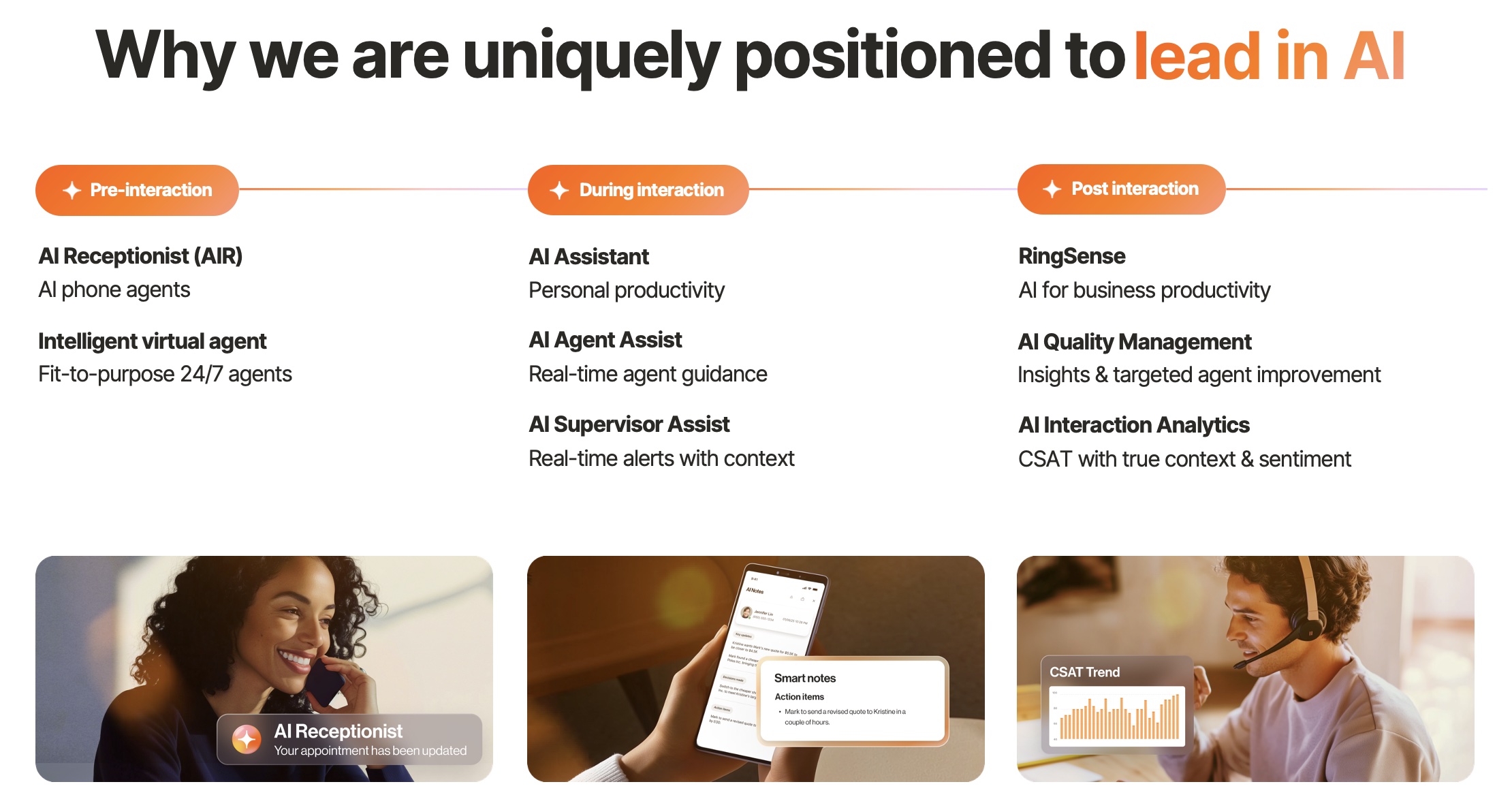
RingCentral is pioneering agentic AI, a new generation of AI agents that actively participate in conversations and drive outcomes. These agents are embedded across the product suite, working together to support employees, serve customers, and streamline operations, including.

  • AI Receptionist (AIR): A fit-for-purpose phone agent that handles routine calls 24/7, routes callers accurately, and delivers human-like responses. It’s easy to set up and ideal for small and midsize businesses looking to scale support without adding staff.
  • AI Assistant: Boosts personal productivity with real-time guidance and task management.
  • AI Agent Assist & Supervisor Assist: Provide contextual alerts and coaching during live interactions with outside callers to your business.
  • AI Quality Management & Interaction Analytics: Analyze conversations post-interaction to improve agent performance and customer satisfaction.


These agents are designed to be intelligent, connected, and effortlessly amplifying the principles that define RingCentral’s platform.

Real Impact Across your customer’s Journey

RingCentral’s AI is already delivering results across the entire customer journey. This end-to-end integration ensures that every touchpoint is optimized for efficiency, empathy, and impact.

  • Pre: AI receptionists and virtual agents handle initial inquiries, reduce wait times and improve first impressions.
  • During: Real-time assistance helps employees respond effectively, while supervisors receive alerts and context to guide team performance.
  • Post: RingSense analyzes conversations to extract insights, measure sentiment, and identify areas for improvement.

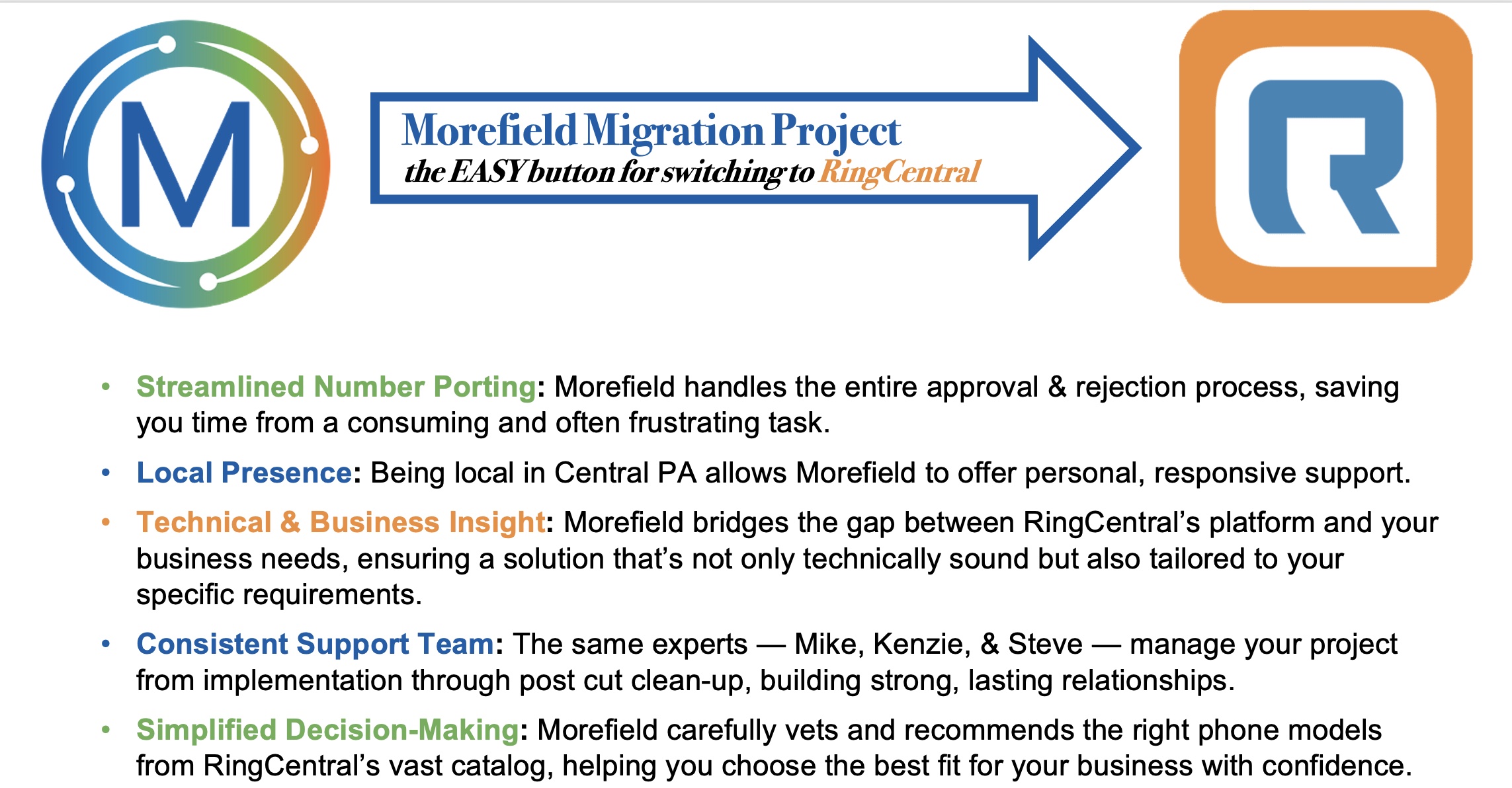
The EASY button for switching to RingCentral – Morefield ProServices

Morefield connection with Ring Central

Morefield simplifies the migration process for businesses transitioning to RingCentral. Our professional implementation services focus on three key benefits for your organization. 

  • Streamlined number porting where Morefield manages the entire approval and rejection process, ensuring you keep your existing telephone numbers
  • Our local presence in Central PA offering responsive and personalized support, we are working by your side and your employees as you make this transition
  • Technical and Business insight to align RingCentral’s capabilities with your specific business needs. 

Migration projects are managed by a consistent, familiar Morefield team who oversee the migration project from start to finish; with simplified decision-making throughout and expert recommendations ensuring you make the best decisions for your organization.

Ready Today, Built for the Future

RingCentral’s AI-powered platform isn’t a future promise—it’s available today. Every product is designed to be intelligent, connected, and effortless, helping teams respond faster, work smarter, and deliver better outcomes.

However, realizing these benefits requires more than a smooth implementation; it takes strategic execution and ongoing IT partnership. As technology continues to evolve at an accelerating pace, working with a partner like Morefield ensures your organization makes informed decisions, adapts effectively, and achieves measurable results from every technology investment.

If you are ready to learn how your organization can benefit from this transformational technology, schedule time with your Morefield representative to coordinate time on your calendar to conduct a technology assessment. Or if you need some additional information, listen to the recording of our live webinar from October 7th.

Sign Up for Our Newsletter