How to Design an Access Control System

How to Design an Access Control System

Physical security has evolved dramatically over the past decade. Today’s organizations—whether a single-site office or a multi-building campus—face more complex security challenges than ever before and controlling who can get through your doors is no longer as simple as issuing a plastic badge. Modern access control blend hardware, software, the network, and cloud services to create verifiable, traceable, and adaptable security frameworks that protect employees, guests, property, and data.

Beginning with the early years at Morefield where the company was a trusted resource for early wired alarm systems and then continuing to provide thought leadership in building access with systems from IDenticard, Premisys, and Acre | Feenics, Morefield has demonstrated how the right access control plan can tighten security, streamline operations, and help your organization adapt as threats and workflows change.

In the article ahead we share a modern approach to developing an access control plan that fits today’s technology landscape.

Why Access Control Still Matters—Even More Today

While cybersecurity gets most of the headlines, physical access remains a major security risk. Unauthorized entry, tailgating, tenant | department crossover, untracked visitors, and outdated mechanical hardware can compromise sensitive data as easily as a phishing link.  A modern access control system can:

  • Prevent unauthorized building or room entry
  • Track movement in sensitive areas (data centers, HR, finance, healthcare records storage, labs, etc.)
  • Generate audit trails for compliance and investigations
  • Integrate with video surveillance, intrusion, HR directories, and visitor management
  • Support mobile credentials and contactless experiences
  • Reduce costs associated with lost keys, rekeying, and manual monitoring

And unlike legacy systems, today’s cloud-enabled platforms allow centralized management and easier scalability across multiple sites.  But none of that works well without an access control plan for your building | campus.

Creating a Modern Access Control Plan
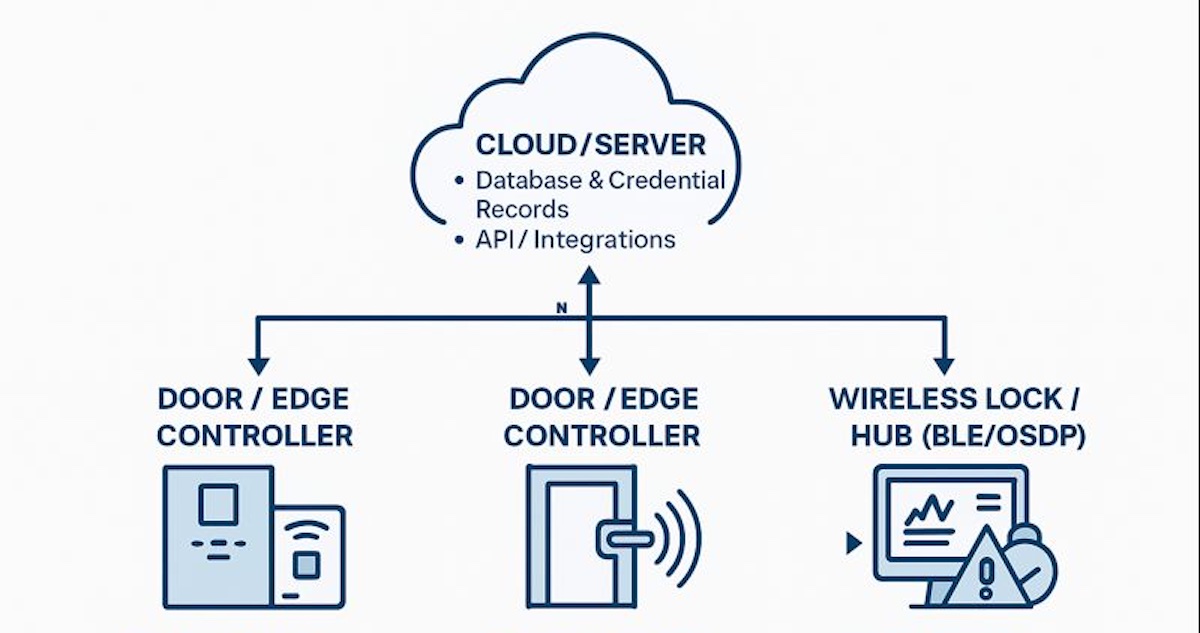
Access Control Tech Diagram

Your access control plan acts as the blueprint for a system that is secure, scalable, compliant, and realistic for the building infrastructure you have today.

A strong plan includes:

  • What areas require controlled access
  • Which credential technologies you will standardize on
  • Where hardware will be placed and how it will be powered
  • How you will monitor, maintain, and audit the system
  • How the system will expand or integrate with future needs

Below are a few strategies for building an effective plan for today’s office and beyond.

Begin With an Assessment of Your Current access control system

Before selecting hardware or software, you must understand how your existing building security operates—formally and informally.  Key questions to ask:

What credential technology are you using?

  • Are you still issuing proximity cards?  
  • Have you adopted smartcards, mobile credentials, or QR-based passes?
  • Do you know whether existing badges can be cloned?

Do you have reliable identity lifecycle management?

  • Who issues cards or mobile credentials?
  • Do deactivated employees still have active cards in your database?
  • Are records syncing with HR, Active Directory, or Azure AD?

What is the total cost of your current system?  Factor in:

  • Licensing
  • Server maintenance
  • Panel repairs
  • Time spent on manual updates
  • Rekeying or lockouts

Where are your gaps?

  • Unsecured perimeter doors
  • Sensitive internal rooms with no audit trail
  • Bottlenecks at elevators, turnstiles, or reception
  • Unknown visitors or contractors accessing areas freely

The more accurate your assessment, honest answers, the stronger your upgrade path will be.

Observe the Real-World Behavior

Technology alone cannot overcome unsafe habits. Observing the behaviors of employees and guests will indicate where training, signage, or automation (e.g., forced-door alarms, delayed egress, door-held-open alerts) may be needed.  During your observation of walk-throughs, look for:

  • Tailgating or “holding the door for someone” without verifying credentials
  • Propped-open doors (often caused by bad hinges, misaligned latches, or convenience shortcuts)
  • Visitors entering without proper check-in or escort
  • Card-sharing between shifts or departments

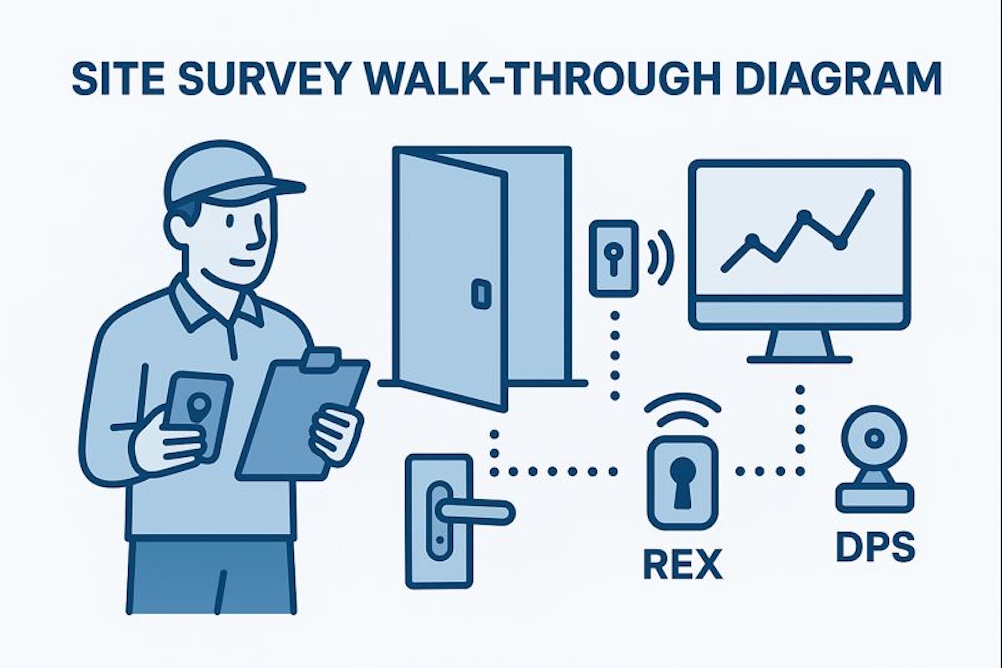
Conduct a Building Survey and Walk Through

This step separates a good installation from a great one. During the walk through consider mechanical and door hardware conditions.  Access control is only as strong as the door:

  • Loose strike plates
  • Damaged frames
  • Poorly closing doors
  • Non-rated hardware

Any electrified hardware (maglocks, strikes, wireless locks, RIM devices) must match the door’s use case and code requirements.  The Building Infrastructure should complement each door with necessary resources for the system to reliably operate;

  • Available cabling pathways
  • Power availability (PoE, local power supplies, battery backup)
  • Network accessibility for controllers or cloud appliances
  • Wireless lock RF viability

Older buildings may require creative approaches—wireless locks, PoE controllers, or surface-mount solutions.

Finally, understanding the threats | adversaries helps determine whether certain doors need single-factor or multi-factor authentication (PIN + card, card + mobile, etc.).  Threat Levels and Asset Value; Identify risks based on:

  • Line of your business
  • Internal vs. external threats
  • Proximity to public access points
  • Sensitive rooms storing data, cash, pharmaceuticals, tools, or equipment
  • Liability or downtime costs if an asset is compromised

Evaluate Hardware and Credential Options

Today’s systems offer options that didn’t exist a few years ago:

Credential Types

  • Encrypted smartcards (DESFire EV2/EV3)
  • Mobile credentials (BLE, NFC, wallet-based)
  • PIN pads or multi-factor readers
  • Biometrics (fingerprint, facial recognition) for high-security zones
  • Temporary/visitor QR codes

Reader Technologies

  • OSDP secure readers replacing legacy readers
  • Multi-technology readers for gradual migration
  • Cloud-managed wireless locks for difficult doors

Controller Architectures

  • Edge controllers (PoE-powered, one-door units)
  • Cloud-native access platforms (Acre Feenics, Brivo, etc.)
  • Traditional on-prem panels where required for large campuses

Your access control plan should reflect the mix of technologies appropriate for your infrastructure and security goals.

Ensure Code, Life Safety, and Regulatory Compliance

A compliant installation protects the organization legally and operationally.  A modern system must meet:

Life Safety (NFPA 101 | IBC Requirements)

  • Egress must always remain safe
  • Maglocks must release appropriately (REX, door position, emergency release)
  • Delayed egress units must be correctly labeled and timed

ADA Requirements

  • Door operators must remain accessible
  • Push plate and sensor placement must be correct
  • Readers must not obstruct clearances

Industry-Specific Regulations

  • HIPAA for healthcare
  • CJIS for law enforcement access control
  • PCI for financial processing environments
  • FERPA for educational institutions

Putting Your Access Control System Plan in Place

Once you’ve created your access control plan, it’s time to install the access control equipment, issue new badges, FOBs, IDs to employees, and address the other gaps identified in your plan. To implement your system properly and efficiently, consider working with Morefield. With more than 80 years of experience, we will provide a proven access control solution tailored to your organization’s needs. To learn more about our physical security services, contact us today.

How Today’s Video Surveillance Protect Facilities, People, and Critical Assets

CCTV system in office

Whether you oversee a single office or an entire multi-building campus, physical security must remain a top operational priority. Your facility houses equipment, sensitive data, intellectual property, customer information, and—most importantly—your employees. Protecting these assets requires real visibility into what happens across your property, indoors and out.

Security teams can’t be everywhere at once, but today’s video surveillance systems can. Modern IP-based surveillance blends high-resolution cameras, smart analytics, cloud management, and secure storage to help organizations detect threats earlier, streamline investigations, and create safer workplaces. Ahead in this article, Morefield experts will break down contemporary systems and what you should consider when preparing for your environment.

How a Video Surveillance System Works

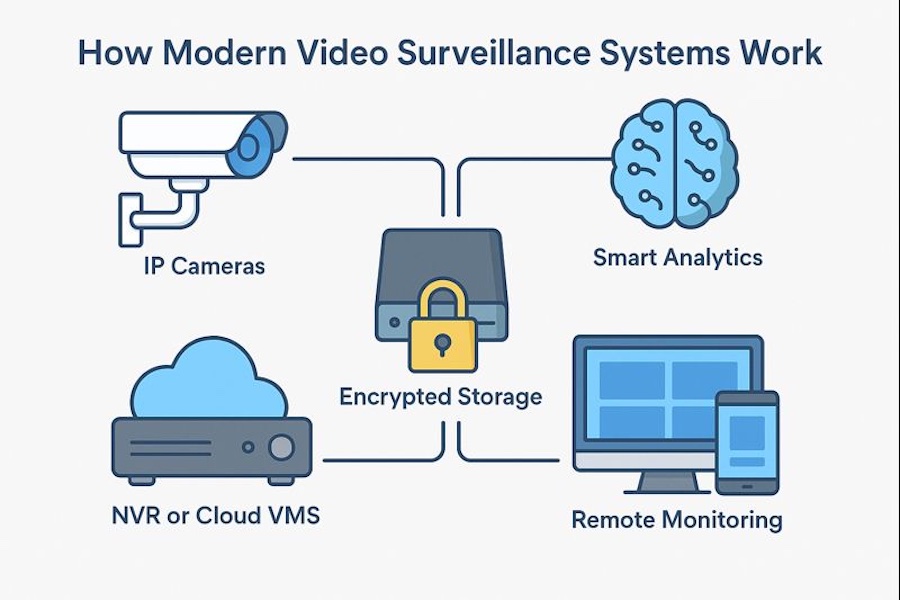
Today’s video surveillance solutions have evolved far beyond traditional CCTV. Instead of closed loops and analog feeds, modern systems are built around IP cameras and cloud accessible video recorders. Core components include:

  • Cameras (single-sensor, multi-sensor, fisheye, PTZ, thermal, low-light, etc.)
  • Network Video Recorders (NVRs) or Hybrid Cloud VMS Platforms
  • Encrypted local or cloud storage
  • Cloud AI engines which provide Smart analytics
  • User friendly dashboards & mobile apps for remote monitoring

These systems provide live and recorded video accessible securely from anywhere, deliver intelligent alerts, and integrate with access control and building management systems.

What Today’s Analytics Can Do

AI-powered video analytics now play a central role. These intelligent capabilities help organizations reduce risk, speed up incident response, and even optimize workflows such as staffing, retail layout, and parking management.  Well-configured systems can alert security or operations teams to:

  • Human and vehicle detection
  • Unusual behavior patterns
  • Loitering or perimeter breaches
  • Line crossing or restricted-area entry
  • Slip-and-fall detection (some platforms)
  • Abandoned or removed objects
  • Occupancy counting and heat-mapping
  • License plate recognition (LPR/ANPR)

Safety Benefits Beyond Security

Video surveillance supports emergency response. Real-time location awareness, occupancy dashboards, and forensic playback can help first responders understand where people are located during evacuations or critical events.

Designing a Surveillance System for Today’s Environments

A modern video system is far more than the mechanical “pull some cables, mount a few cameras and hit record.” To achieve long-term value, you need a design tailored to your facility, infrastructure, and operational goals.

When you work with a professional integrator like Morefield, we will consider the following.

Define the System’s Purpose and Priorities

Organizations adopt video surveillance for many distinct reasons. Start by defining the highest-value outcomes for your deployment:

  • Deterring theft or unauthorized access
  • Monitoring critical areas such as server rooms or cash-handling spaces
  • Gaining situational awareness across large campuses
  • Supporting safety and compliance initiatives
  • Improving traffic flow or employee productivity
  • Reducing investigation time and liability costs
  • Integrating video with access control or intrusion alarms

The clearer your objectives, the more precisely Morefield can help you match camera types, resolutions, and analytics features to your needs.

Conduct a Thorough Site Survey

A detailed site survey is essential—this is where most successful projects are won.  A modern survey includes assessing:

  • Existing network infrastructure: switch capacity, PoE, cable, VLAN needs
  • Environmental conditions: lighting, weather, vibration, temperature swings
  • Physical constraints: ceiling height, mounting surfaces, conduit routing
  • Existing systems: analog cameras that may need migration or hybridization
  • Operational risk zones: areas where loss, liability, or safety concerns are highest

Common priorities that Morefield encounters include:

  • Building entrances/exits
  • Parking lots, garages, and perimeter fencing
  • Reception and waiting areas
  • Shipping/receiving docks
  • IT closets and data centers
  • Cash handling, financial processing, and records
  • High-value equipment rooms
  • Elevators and stairwells
  • Remote or poorly lit areas

As a professional installer, the Morefield ProServices team will evaluate light challenges (glare, backlighting), your required field of view, and optimize frame rates to ensure the captured video is usable during an investigation.

Select the Right Cameras for Each Location 

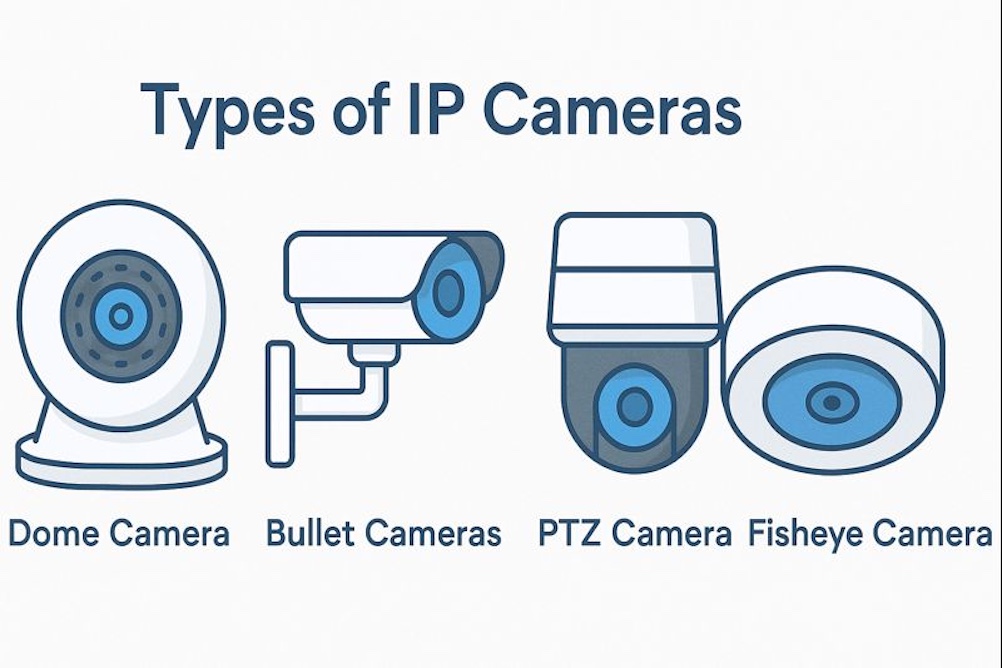
Types of Ip Cameras

Different environments require different camera technologies. Today’s IP camera families include:

Single-Sensor Cameras

  • Best for hallways, focused views, controlled lighting
  • Cost-effective and simple to install
  • Available in fixed dome, turret, or bullet formats

Multi-Sensor or Multi-Directional Cameras

  • Provide 180° to 360° coverage from one mounting point
  • Dramatically reduce blind spots
  • Useful in lobbies, warehouse corners, parking lots
  • Often more cost-effective than installing multiple single cameras

PTZ (Pan-Tilt-Zoom) Cameras

  • Ideal for active monitoring by security officers
  • Excellent for wide-area surveillance such as campuses or production yards
  • Powerful optical zoom for long-distance identification

Specialty Cameras that are engineered for a specific application:

  • Fisheye 360° cameras for complete room coverage
  • Thermal cameras for perimeter breaches and low-visibility conditions
  • Low light | starlight cameras for nighttime clarity
  • LPR | ANPR cameras for vehicle identification
  • Explosion-rated cameras for hazardous industrial zones

Resolution Considerations

Higher resolution, more MP (mega-pixels) doesn’t automatically mean better results—but resolution must match the goal:

  • 2–4 MP: General surveillance, wider angles, cost-efficient
  • 6–8 MP: Improved detail for facial features, identifying individuals
  • 12–20 MP (or multi-sensor equivalent): Large areas requiring forensic-level detail
  • Thermal resolution: Based on detection vs identification needs

Morefield’s surveillance professionals will account for lens selection, compression settings, low-light performance, and bit-rate management to ensure storage retention meets requirements without unnecessary cost.

Work with a Surveillance Expert

Planning for a new system installation can feel daunting, especially if you have strict security requirements or a lot of area to cover. When you work Morefield our surveillance experts, will ensure you get a system tailored to your needs.

At Morefield, we have more than 80 years of experience helping Central Pennsylvania organizations protect their assets with integrated physical security solutions. We can implement video surveillance systems skillfully and efficiently to provide the best results. If you’re ready to start planning your new system, reach out to us today.

Security for Education

Improve Campus and Student Safety with Security Technology

Using Video Security on School Campuses

Prioritizing student safety, teacher safety, and facility safety is a must for schools looking to instill a safe learning environment. Given the prevalence of school-based violence today, school officials shouldn’t wait for an incident to occur before prioritizing security.

To better prepare themselves for any future situation, school safety and security teams turn to video security as a way of reducing campus crime and enhancing visibility into day-to-day activities and operations.

How are Security Camera Systems used on School Campuses?

  • Deter Crime on Campus: Security in schools can also safeguard schools from more common, day-to-day incidents. Specifically, school security cameras discourage instances of school-based vandalism, larceny, and assault, as well as many additional types of suspicious or nefarious behavior, by regulating and standardizing school visitor management around the clock.
  • Enforce Positive Student & Teacher Behaviors: To reinforce positive student and teacher conduct, many officials depend on cameras. By monitoring footage from security cameras in classrooms and hallways, school security personnel can ensure that proper school conduct is being observed.
  • Incident Resolution: Most inter-student conflicts include two opposing accounts of an incident. Cameras give school administrators the ability to consult definitive video evidence of an event. Having cameras in schools can also offer objective video evidence of incidents involving harm or theft in classrooms, hallways, and other high-traffic areas. This footage is used to identify suspects, and serves as compelling evidence during the disciplinary phase of investigations.
  • Remotely Monitor Large Open Spaces: For school or campus safety teams at safe educational institutions, increasing situational awareness is an ongoing goal. These schools aim to provide reliable Security for large facilities to ensure school gym, auditorium, parking lot, and playground safety. Ultimately, these schools maintain a level of situational awareness that schools and colleges without Security simply can’t reach.
  • Remotely Monitor Entrances, Exits, and Other Blind Spots: Monitoring blind spots such as entrances and exits can mitigate any school safety risks. In fact, the best school safety teams implement 24/7 recording in high-traffic or high-risk areas such as these. By recording all activity during and after business hours, officials are substantially more likely to catch intruders and unauthorized activities.
  • Give Parents Peace of Mind: Actively monitoring footage from cameras can reinforce the confidence and trust that parents have in their child’s school, and can give them peace of mind during the day. As a result, proactively monitoring—and even rewarding—positive student and teacher behavior can be an integral part of school safety procedures today.

Must-Have Features for Campus Video Security:

  • Ability to Quickly Find & Share Footage: To ensure student safety, being able to quickly access and share footage of time-sensitive events is critical. When emergencies arise, truly safe schools won’t be tied up searching for footage, and law enforcement won’t be held up by it. With centralized footage, the ability to quickly find incidents of interest, and the ability to quickly share this footage with authorities, will give these schools the best chance at quick, safe, and calm emergency resolution.
  • Easy Non-Technical User Experience: Installing cameras that require technical fluency substantially limits the role principals, superintendents, and front office personnel can take in monitoring. This places responsibility of footage access and retrieval on school safety and security IT personnel, rather than on the stakeholders who require the footage. This leads to slower incident resolution, overcommitted school IT departments, and—as a result—less-than-ideal safety on campus.
  • Low-Bandwidth School Cameras: Improving school safety shouldn’t necessitate reductions to on-campus Internet speed and capability. Security cameras can be significant consumers of bandwidth, which can lead to compromised video quality, limited video storage, and even system failure. It’s important to find school Security cameras so schools don’t have to choose between expensive bandwidth upgrades and child safety in school. In fact, a security solution with sufficiently low bandwidth consumption can even enable bus cameras for school bus monitoring.
  • Affordable: Most school officials unfortunately have razor-thin school safety budgets, so it’s necessary to prioritize affordability when searching for a campus safety and security option. Oftentimes, cheaper cameras possess lower camera quality and decreased footage usability, which jeopardizes K-12 and college safety. Instead, officials should consider vendors who offer 10-year product warranties, which make it easy for schools to offset costs of maintenance over time, as well as systems that offer high levels of coverage per camera.

How Education Stakeholders Use School Video Security

Security and Campus Patrol

  • Can remotely monitor large areas more effectively
  • Can reduce bullying and optimize bullying intervention programs
  • Can keep intruders out without stationing security officers at each access point

Principals and Superintendents

  • Can see and track what’s happening at each school facility
  • Can remotely monitor day-to-day operations, as well as teacher and staff efficiency
  • Can use in campus security footage in disciplinary cases and liability claims

Teachers, Students, & Parents

  • Can attend school more securely and confidently
  • Can conduct campus functions and events more securely
  • Can enforce positive behaviors on campus

Final Takeaways: Using Video Security for Campus Safety

From school bus security cameras to national bullying programs inspired by camera footage, there are endless ways Security can serve school officials willing and able to use it. Without Security in schools, K-12 and college campus security teams are risking a lack of visibility and streamlined process.

Put simply, it is this Security visibility that enables efficient, educated incident response—and it is this incident response that enables kids to be safe at school.

Benefits of an Access Control System

Benefits of an access control system

Security is a top priority for businesses of all sizes. If you work with confidential information or expensive equipment, protecting your business’s assets is essential to success. Whether you have 10 or 10,000 employees, an access control system can allow or deny access and let your employees go where they need to go. 

Access control systems can make life easier for your employees, save you money and keep your workplace secure. Whether you are a business owner weighing the pros and cons of an access control system, or an administrator looking for reasons to get one, this guide has your answers.

What Is an Access Control System and How Does It Work?

An access control system allows or restricts access to a building, a room or another designated area. It is an electronically powered form of physical security that manages who has access to a location at a particular time.

The User Experience

An employee who wants to enter an access controlled location presents their credentials. Credentials could be physical, such as an access control key card, or digital, such as information on a mobile device. A person makes an unlock request at a card reader, which then sends the information to an Access Control Unit, then authorizes the user and triggers the door to unlock.

The System Manager Experience

On the administrative side, an access control system has a management dashboard or portal. The control portal allows office administrators, IT managers or heads of security to specify who can access the premises and under what conditions. The manager can create settings based on shifts, time of day, the employee’s rank or job title and more. This system may also include a physical component, like a card-programming machine.

The System Infrastructure

The infrastructure of an access control system covers electric locks, card readers, door status for monitoring traffic and request to exit devices all reporting to the control panel and then the server:

  • Electric locks: Fail safe locks, which will lock when supplied with power, and fail secure locks, which will unlock when supplied with power. Fail safe locks are necessary for doors on fire escape routes, and fail secure doors are for rooms that need to be protected in the event of an outage, such as an IT office. Fail secure doors will still need push bars that allow people to exit but not reenter in the case of an emergency.
  • Access control panel: The control panel is usually set up in a secure location, such as an IT room or an electrical closet. Whenever someone’s credentials are scanned, the signal is sent to this control panel, which then sends the authorization to unlock the door. 
  • The access control server: The server stores the access control system’s data and permissions. This system decides to unlock a door for a specific user and tracks data for who enters and when. Servers can exist on a dedicated computer, a cloud-based service or in the card reader itself.

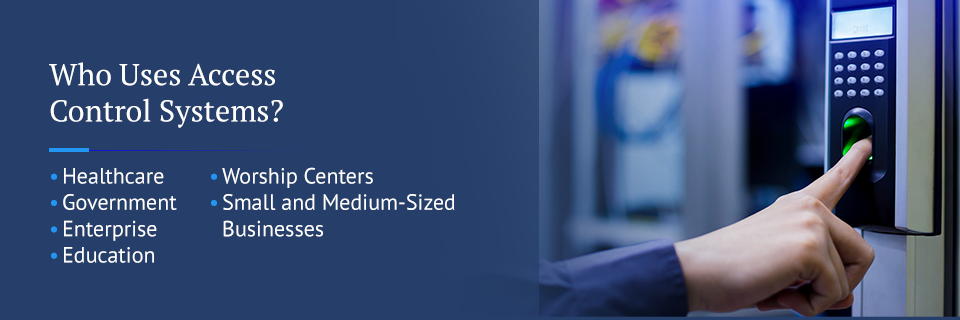
Who Uses Access Control Systems?

who uses an access control system

An access control system simplifies security in many ways. So, anyone with security needs can benefit from an access control system. Typically, in a rented office space, the landlord controls access to the building itself, and the tenants manage the access control for their areas. There are a variety of industries who can gain from access control systems, such as:

Healthcare

Those in the healthcare industry use access control systems to follow HIPPA regulations for health data confidentiality. Doctor’s offices, insurance companies and hospitals alike protect patients with access control systems. Access control systems can protect IT rooms or even equipment racks from unauthorized access, helping keep digital data secure. It can also safeguard physical files, examination rooms and equipment like MRI machines.

If you store chemicals or biomedical waste, access control systems can prevent untrained individuals from getting hurt.

Government

For local and state governments, security is a top priority. Government buildings are subject to homeland security regulations, which may mean restricting entry. Access control systems can verify employees and limit access to departments, confidential information and more, while maintaining public access to other areas.

Enterprise

Any business that accepts and processes credit cards must meet PCI credit card data regulations. Access control systems can also limit access to IT rooms and servers. They can track who accesses certain data and when, further protecting the information. 

Education

Schools, especially universities with large campuses, have multi-location security needs. Access control systems make managing entry a breeze. Access control can keep students out of faculty parking lots, unauthorized individuals out of dorm rooms and more. If you have lab equipment or expensive computers, access control systems can be programmed to ensure only those registered for corresponding courses can access these areas.

Worship Centers

In sanctuaries and spiritual centers where all are welcome, balancing security and accessibility can be difficult. Access control makes it easy, keeping doors open during services and locked at other times. Churches, temples, synagogues and mosques can track employee’s comings and goings. They can also keep areas like schools, daycare centers and offices secure while keeping the rest of their facilities open to all.

Small and Medium-Sized Businesses

Key cards and access control systems are for more than big corporations with thousands of employees. Small and medium-sized businesses can reap the benefits of using an access control system, too. Access control is scalable, so small businesses can find solutions that work for their size and budget.

The right access control security system will be user-friendly, so you can protect your business without a security or technology background. 

types of access control systems

What Types of Systems Are There?

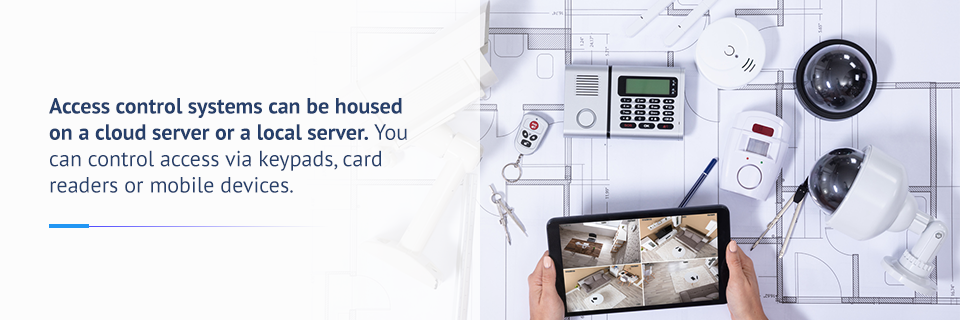
Access control systems can be housed on a cloud server or a local server. You can control access via keypads, card readers or mobile devices. When it comes to setting permissions, you have three options for how you can manage access:

  • Role-based access control: In this control structure, all users who have the same role have equal access. For example, in a healthcare lab, all researchers can access a chemical storage room, while administrators cannot. This system can grant access based on the level of privilege, so employees of various seniority only access what they need.
  • Discretionary access control: In this model, the business owner has control over who has access to each entry point. Each door’s card reader has a list of authorized users, set by the business owner, and these individuals have access to that building or area. 
  • Mandatory access control: Mandatory access control is the most restrictive. In this case, a policy, software or hardware component restricts access without exception. Mandatory access works for larger organizations where a head of security determines the rules that grant access. For example, employees may need to know a password or enter a pin into a keypad to enter a building. This is ideal for companies with lots of specific security needs, such as tech companies. It allows a centralized authority like a security office to make policy decisions about who can access what areas. It also enforces standardized security policy across many locations.

What Are the Benefits of Access Control Systems?

How can an access control system help your business? No matter the size or industry, automated access control can protect employees and let administrators know who accesses the premises. The most significant benefits of access control systems are:

1. Increase Ease of Access for Employees

An access control system allows you to “set and forget” who has access to each area of your business. Once you give the authorization, an employee can access all the areas they need to get their jobs done. With the scan of a key card or input of a PIN, the employee can get to wherever they need with ease.

2. Get Rid of Traditional Keys

The use of traditional keys has a few drawbacks. Restricting access to particular areas requires individual keys. The larger the building, the more locks you need. For an individual like a janitor or a high-clearance individual, this can mean a bulky key ring and confusion about which keys do what. An access control system saves time for those accessing restricted areas and also saves you visits from the locksmith.

Also, keys can be duplicated, leaving you vulnerable to unauthorized access. If an employee doesn’t turn in their key before they leave your company, you leave yourself unprotected or must get your locks changed. Access control security does away with this.

3. Save Money and Energy

With access control security, you save money on locks and security personnel. An access control system can verify a person’s identity without the need for a security guard.

access control can save you money

Access control systems can also be integrated with lighting, heating and cooling systems. Lights can turn on when there are people in a room and will shut off when they leave. You can also adjust temperatures when no one is in an area to save on energy costs.

4. Keep Track of Who Comes and Goes

An access control system gives you data on who enters and exits a building or room and when. You can ensure people are working when they are supposed to be. If theft or an accident occurs, you know exactly who accessed a specific area at the time of the incident.

5. Protect Against Unwanted Visitors

A large company creates an opportunity for visitors to go undetected. One of the benefits of using access control systems is that unauthorized people cannot get in. Since doors need credentials before they unlock, only those you’ve given credentials to can access the area. With this system, you can be sure everyone in your building is supposed to be there, whether you know them or not.

6. Give Employees the Freedom to Work When They Need To

When employees work at different times, an access control system lets them enter whenever they need to. People can come in early without waiting for someone to unlock the doors, and managers don’t have to stay late to lock up at the end of the day. You’ll have the ability to offer flexible schedules for your employees. With the management dashboard, you can also check comings and goings without being there yourself.

7. Prevent Against Data Breaches 

Health information, financial records and client data are often stored on company-owned servers. Access control systems can restrict or grant access to IT rooms and even individual computers or networks, so only trusted individuals may access them.

8. Create a Safe Work Environment

Access control systems let trusted individuals inside and keep others out. You have the freedom to do background checks and keep out anyone without the right credentials.

Also, access control systems can keep your employees safe in the case of an emergency. Doors with lock-and-key mechanisms remain locked, which can be unsafe when a fire or other emergency requires a swift escape. Through the use of fail safe locks, doors unlock when the power cuts out, so all people can exit a building without the need to fumble for their keys.

9. Reduce Theft and Accidents

You can protect your company’s assets, expensive equipment or even office supplies by controlling access. You can restrict access to supply closets and computer banks, so only trusted individuals can access them. Employees know their arrivals and departures are tracked, which deters theft.

Also, lab equipment or chemicals in schools or hospitals can injure people who aren’t trained to use them. To prevent accidents, you can restrict access to only those who know how to follow safety protocols.

10. Provide Access to Multiple Buildings and Locations

Traditional key-based security gets complicated in areas with multiple locations. A school with two campuses might have some faculty members that teach at both and some that teach only at one. A hospital with two buildings might need to grant different levels of access to people who work in each building or on each floor. A national or regional company might set security policies at their headquarters to be followed at each branch. 

Each of these situations can be managed with an access control system that can customize and implement access permissions across many locations.

11. Comply With Industry Regulations or Security Standards

There are many regulations for data security that need restrictions on physical access to data. Anyone in the healthcare industry must comply with HIPPA, but most organizations are subject to these regulations as well. If an employee or student requests a medical leave, records of the individual’s illness must be kept secure. In the world of commerce, customers’ financial information must be kept safe, and IT Departments must restrict access to servers and digital data.

All this information, whether it is a digital or paper file, can be secured with an access control system.

Find the Right System With Morefield Communications

At Morefield Communications, we help find the security solutions that fit your needs, size and budget. Access Control Systems are an excellent solution to security needs that work well on their own and as part of a physical security network. With over 75  years of service, we have the expertise to provide reliable security solutions. 

work with a technology expert

As a Pennsylvania-based company, we are invested in the success of local businesses, as well as our community, which helps us find the most efficient solutions for our customers. When you choose Morefield Communications as your security provider, you receive a holistic approach to all of your technology needs.

To discuss how we can help you protect your business and give your employees a safe work environment, contact us today.

Sign Up for Our Newsletter