Guide to Room Acoustics

Guide to Room Acoustics

When we talk about how a space sounds, we’re really talking about its acoustic profile—the unique way a room reacts to, enhances, or diminishes sound. Just as a concert hall is carefully engineered to produce warm, natural reverberation that elevates an orchestra’s performance, a typical high school gym produces a completely different experience: harsh reflections, unintelligible speech, and long decay times.

The same logic applies to modern workplaces, classrooms, huddle rooms, and collaboration environments. With the rise of hybrid work and the increasing reliance on conferencing platforms like Microsoft Teams, Zoom, and Webex, room acoustics are no longer optional—they’re operationally-critical.

Most spaces today are designed for aesthetics and functionality, not acoustics. But with the right acoustic strategy, any room can be transformed into a space that supports clarity, comfort, and productivity.

What Are Room Acoustics?

While many people instinctively recognize the difference between a laptop speaker and a cinema sound system, fewer understand the massive role that the room itself plays in the listening experience.

Room acoustics describes how a physical space shapes sound through:

  • Reflections
  • Absorption
  • Diffusion
  • Reverberation time (RT60)
  • Background noise levels (NC | RC ratings)
  • Construction materials and geometry

AV integrators and acoustic consultants use sophisticated modeling software to predict how sound behaves in a room before construction even begins. These tools allow Morefield to optimize rooms for conferencing, learning, presentation, and collaboration from day one.

Even with high-end microphones, beamforming arrays, and DSPs, poor acoustics can defeat the best AV systems. A room’s acoustic profile is the foundation of audio quality.

How to Tell If a Room Has Good Acoustics?

Good acoustics are essential anywhere people communicate—whether in small meetings, hybrid collaboration, large presentations, or training sessions.

Signs your space may have acoustic problems:

  • Excessive echo or long reverberation
  • Hard, reflective finishes (glass walls, tile floors, metal ceilings)
  • Speech that sounds “tinny,” “boomy,” or unclear
  • UC platforms struggling with echo cancellation
  • Listeners reporting fatigue during meetings
  • Side conversations easily heard across the room
  • HVAC or hallway noise bleeding into the space

A quick DIY test (to try in your space):

Grab a co-worker and then stand across the room from each other.  Try to hold a low-volume conversation across that room. If it feels like every sound is amplified—or is difficult to understand.  If you hear reflections “trailing” your speech—your room likely needs acoustic treatment.

Hybrid workflows make this even more critical: if the people on the far end of a MS Teams call can’t clearly hear your presenters, the entire meeting loses efficiency.

Modern Approaches to Improving Room Acoustics

Today’s acoustic design focuses on creating a balanced, neutral, and controlled environment that supports:

  • Speech intelligibility for in-room listeners
  • Clarity for far-end participants in video calls
  • Consistent audio pickup for modern microphones
  • Compliance with WELL and industry standards

Here are some examples of how Morefield solves for these acoustic challenges:

 Increase Acoustic Absorption

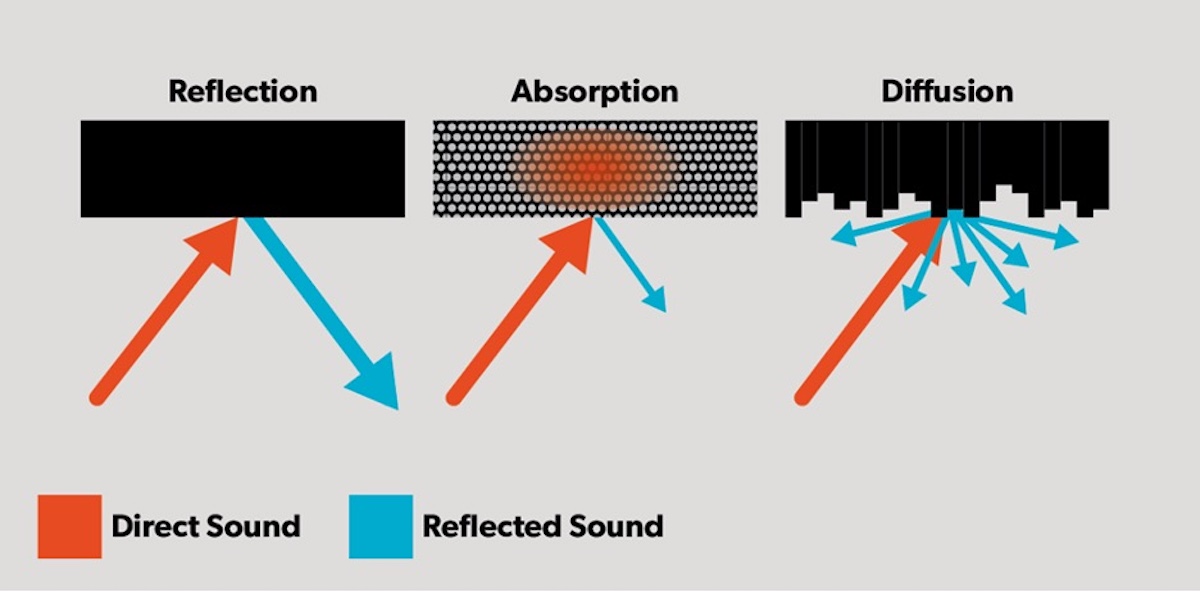
Sound waves interacting with the room either reflect or absorb. Reducing harsh reflections is the fastest way to improve clarity.  Modern absorption options include

  • Fabric-wrapped acoustic wall panels
  • PET felt panels (sustainable and customizable)
  • Acoustical ceiling tiles
  • Baffles, clouds, and suspended elements
  • Upholstered seating and soft furnishings
  • Acoustic curtains or drapery

Placement matters as well. Panels should be positioned at:

  • First reflection points
  • Opposing parallel walls
  • Rear walls of meeting rooms
  • Ceiling locations where reverberation “pools”

 Add Diffusion Where Appropriate

Absorption reduces reflections; diffusion scatters them to create a more natural sound field.  Diffusive elements include:

  • 3D geometric wall tiles
  • Bookshelves
  • Wood slat walls with integrated acoustic backing
  • Hybrid absorber/diffuser products

Diffusion is especially effective in classrooms, training spaces, large meeting rooms, and blended-use AV environments.

 Treat the Ceiling

Ceilings are often the most neglected acoustic surface.  Solutions can significantly reduce reverberation and improve microphone performance.  Modern solutions include:

  • Acoustic cloud panels
  • Microperforated wood ceiling tiles
  • PET felt cloud arrays
  • Acoustic mesh or stretched fabric ceilings

Manage Background Noise

Mechanical noise from HVAC, air diffusers, outside traffic, or adjoining spaces must be controlled. Masking systems can also be used strategically—though for conferencing spaces, masking is typically applied outside the room rather than inside.  The compliance standard for room types include:

  • NC/RC 25–35 for conference rooms
  • NC/RC 30–40 for classrooms
  • NC/RC 35–45 for open offices

Design with AV Integration in Mind

Even top-tier products cannot overcome poor acoustics. Acoustic treatment is the bedrock on which AV performance rests.  A modern UC room is an ecosystem. Acoustics directly impact:

  • Beamforming mic performance
  • DSP echo cancellation
  • Auto-mixing algorithms
  • Camera auto-framing accuracy (audio-triggered)
  • Far-end intelligibility

Why Room Acoustics Matter at Work

Better acoustics directly improve:

  • Meeting efficiency and participation
  • Hybrid meeting equality
  • Client communication and engagement
  • Employee confidence when presenting
  • Listener comfort and reduced fatigue
  • Speech privacy and focus

Poor acoustics often lead to:

  • Miscommunication
  • Staff frustration
  • Lower productivity
  • AV systems that “sound expensive but perform poorly”
  • Frequent complaints about audio quality

A few strategic upgrades—panels, ceiling treatments, layout adjustments, or noise management—can transform the entire communication experience.

Working With a Morefield Room Acoustics Expert

Sometimes simple, DIY fixes aren’t enough, and when it comes to acoustically treating a room, it’s best to call in the experts. Morefield provides consultation and installation of acoustic upgrades, and so much more. Our experienced staff can guide you through every step of the process, and Morefield provides expert installation that will improve your office building acoustics.

Don’t get stuck wondering how to get better sound in your rooms. Contact Morefield for dedicated, experienced help. With over 80 years of serving the Central Pennsylvania business community, our experience speaks for itself. We will give you the best experience, keep your costs manageable and deliver the best outcome.

To find out more about our acoustic room design, or any of our business technology solutions, contact us today.

What is Sound Masking? Acoustic Privacy for a Hybrid Workspace

what is sound masking

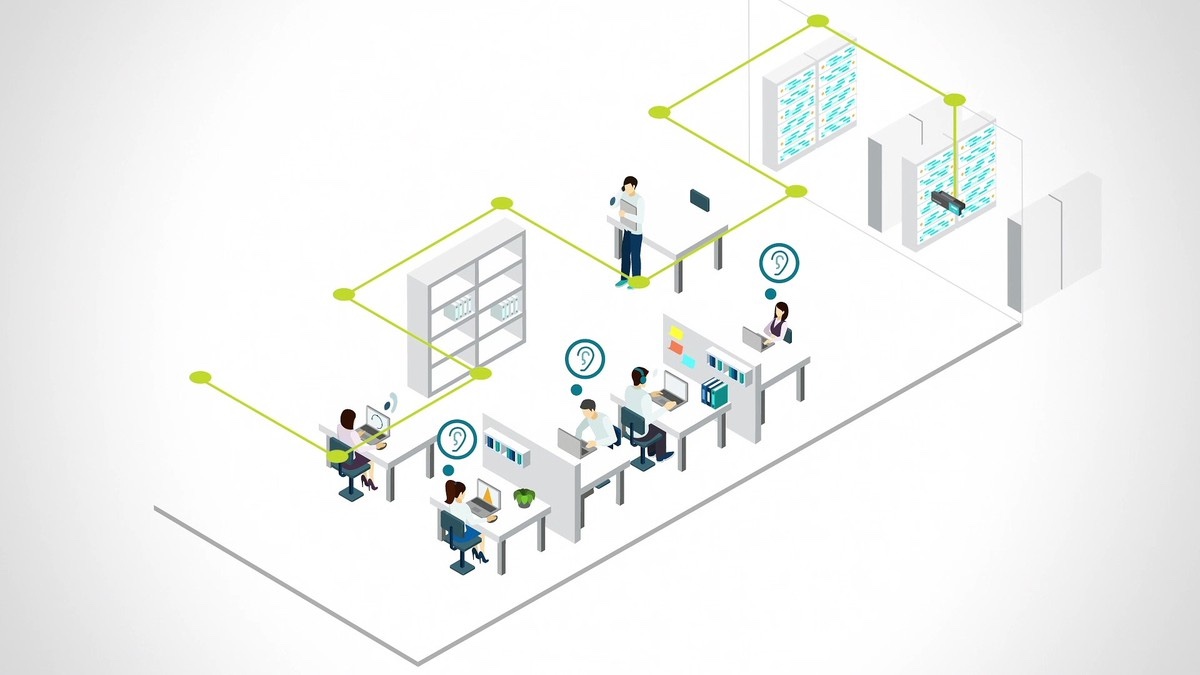
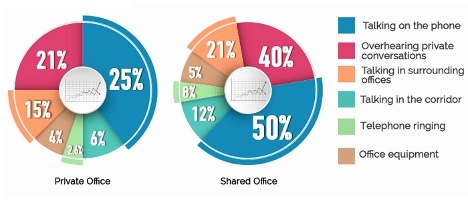
Over the past decade, the workplace has undergone dramatic transformation. Hybrid work, activity-based layouts, and the continued shift toward open architecture have improved collaboration and space utilization—but they’ve also intensified a long-standing challenge: distraction and speech privacy. With fewer physical barriers and more shared spaces, employees often struggle to focus while hearing conversations, typing, impromptu huddles, and even HVAC and building mechanical noise.

Today sound masking has evolved into a sophisticated acoustic privacy technology that blends advanced DSP processing, zoned control, and intelligent emitters to create a comfortable, productive acoustic environment. Rather than making the room louder, today’s systems generate a controlled, uniform background sound that reduces speech intelligibility and helps occupants concentrate without feeling isolated.

Let’s break down what modern sound masking is—and how it supports productivity in today’s connected workplace.

What Is Sound Masking?

In any open office or mixed-use space, audible distractions are inevitable. Human speech is particularly problematic: our brains are wired to decode language, so even conversations we don’t want to hear can hijack our focus.

Modern sound masking systems solve this by generating a precisely tuned audio spectrum—typically between ~200 Hz and 6 kHz, the same range where the intelligibility of human speech resides. But unlike the “white noise” of early systems, today’s masking solutions use adaptive, data-driven frequency curves that blend naturally into the environment.

Good masking should be felt, not heard—a subtle, neutral “whoosh” that reduces how far conversations carry, making unwanted speech fade into the background. Employees don’t experience silence; instead, they experience a balanced and controlled acoustic profile that supports productivity and comfort.

How Does Sound Masking Work?

Sound masking deployment

Today’s sound masking systems integrate:

Intelligent Emitters

Distributed speakers installed in a ceiling tile grid, plenum, or direct-field application.  To ensure a seamless, even masking field across large spaces, modern emitters use:

  • Wider dispersion patterns
  • More consistent phase alignment
  • Improved low-frequency performance
  • PoE or low-voltage daisy-chain power

Digital Signal Processing (DSP) Engines

Contemporary systems incorporate:

  • Adaptive EQ curves based on real-time ambient noise
  • Time-of-day profiles
  • Automatic gain control
  • Zone-specific tuning
  • Networked monitoring via secure dashboards

This allows each zone—open offices, huddle rooms, call centers, reception areas—to have independent masking levels tailored to the spaces acoustic requirements.

Speech Privacy Optimization

Masking reduces what we call the Speech Intelligibility Index (SII)—the measure of how far and how clearly speech can be understood. By decreasing intelligibility radius, conversations become nonsensical at short distances, which the brain quickly filters out.

Integration with Building Systems

Facility managers and AV teams are able to treat acoustics as a dynamic, manageable component of the work environment.  Sound masking frequently integrates with:

  • Paging and emergency notifications
  • IoT sensors
  • Smart building platforms
  • Occupancy analytics
  • WELL v2 acoustic performance standards

What Are the Benefits of Sound Masking?

Sound masking offers a wide variety of benefits with everything from security improvements to comfort:

  • It can improve productivity and focus:A consistent masking field reduces distractions and helps employees remain in a “flow state.” Numerous workplace studies confirm that even brief interruptions can significantly degrade cognitive performance—sound masking reduces both the frequency and impact of these interruptions.
  • Enhanced Workplace Comfort:Discomfort from intermittent noises, conversations, and unpredictable acoustic peaks is a major contributor to workplace dissatisfaction. Modern masking stabilizes the acoustic landscape, delivering a calm, consistent sound profile that supports well-being.
  • Confidentiality & Speech Privacy: Modern masking systems are commonly deployed in environments where speech privacy is essential:
    • HR and legal offices
    • Healthcare (HIPAA-sensitive areas)
    • Call centers and contact hubs
    • Banks and credit unions

    Masking ensures sensitive conversations stay private—critical in regulated industries.

  • It offers flexibility: Today’s systems are adaptability for hybrid workplaces where layout changes are frequent.
    • Per-zone tuning
    • Per-emitter adjustments
    • Direct-field or in-ceiling plenum options
    • Seamless expansion as spaces evolve
    • Software-based configuration and cloud monitoring
  • It offers a fast return on investment: Sound masking begins improving focus and reducing distractions immediately upon deployment. For many organizations, the productivity gains, improved employee satisfaction, and reduced acoustic complaints deliver a rapid ROI—often within months.

Where Sound Masking is Commonly Used Today

where sound masking is commonly used

While still popular in open floor plans, masking has expanded into numerous environments as organizations recognize its value:

  • Private offices: Thin walls and modern glass partitions often lack true acoustic separation. Sound masking ensures conversations remain private and reduces spillover between adjacent offices.
  • Call centers & Customer Support Hubs: Many 2025 call centers operate in dense layouts with high agent conversation volume. Masking dramatically improves both employee comfort and caller experience.
  • Healthcare: As masking helps prevent inadvertent disclosure of protected patient information.  With HIPAA compliance and patient dignity drive widespread adoption of sound masking in:
    • Hospitals
    • Clinics and exam areas
    • Pharmacies
    • Behavioral health environments
    • Waiting rooms and reception areas
  • Financial institutions: Banks and credit unions leverage masking to ensure confidential conversation at teller stations, desks, and member service offices.
  • Legal, HR, and Professional Services: Whenever privacy matters—interviews, performance reviews, client consultations—masking reduces risk and improves comfort.

Sound Masking is a Core Component of Workplace Design

Sound masking isn’t just an optional add-on—it’s a foundational component of workplace AV design. As layouts continue evolving toward open, adaptable, and collaborative architecture, masking provides the privacy, comfort, and acoustic control employees need to stay productive.

With modern DSPs, adaptive tuning, hybrid-work integrations, and expanded IoT capabilities, today’s sound masking systems deliver unmatched precision, flexibility, and reliability.

As you can imagine, an interconnected system like this can get a little complicated. Fortunately, Morefield can help. For our Central Pennsylvania clients we engineer sound masking systems that integrate quickly and easily, with minimal interruptions to your workday.

Morefield has been helping Central Pennsylvania businesses find the right technology solutions for over 80 years. Contact us today to learn more about a sound masking system that can help your employees work smarter.

When to Work With an AV Integrator

av integrator working with architect

Audiovisual systems are essential to all kinds of businesses. If you’re looking to add a new room in your company building, or you are moving to a new office space, your AV needs can quickly become complex. AV integrators can provide essential expertise and services to tackle these issues for you. But what exactly does an AV integrator do, and how do you know if you need one?

What Does an AV Integrator Do?

AV integrators oversee the installation and management of your AV solutions. They work to ensure that technologies are integrated for maximum efficiency and productivity, and that everything is running smoothly.

From troubleshooting to repairing to maintaining your company’s AV system, AV integrators are essential to keeping your AV system healthy so that your day-to-day operations are not affected by any AV issues.

AV integrators also provide design and equipment services to effectively set you up with a new AV system that is properly integrated and standardized for easy management.

Signs You Need to Bring in an AV Integrator

AV systems can be complex to work with, especially when they are interacting with other systems. But how do you know if you need to bring in an AV integrator? Here are some top signs that it’s a good idea for your business:

  • You need a complex AV solution.
  • Your AV system needs to work with other system solutions.
  • You want to make sure you’re getting the biggest return on your investment in the AV system.
  • Your project is very large and you don’t have all the necessary resources to tackle it without assistance.

It’s important to keep in mind that the sooner you can bring in an AV integrator, the better. When they are involved from the start, they will be able to guide the design and installation process for a smoother and quicker process.

What to Look for With an AV Integrator

AV integration is a growing field, and you will likely have numerous candidates to choose from. When you’re deciding on the best AV integrator for the job, there are several important factors to consider:

  • Customized solutions: Every company has different AV needs, and your potential AV integrator should provide solutions that address your unique challenges.
  • Design services: The AV integrator should provide a design that is specific to your needs, cost-effective and addresses ongoing challenges.
  • Ongoing support: An AV integrator should provide ongoing technical support and service to ensure that your system continues to run smoothly and that all issues can be addressed.av integrator working in office
  • Proven experience: Any potential candidate for your AV integrator position should have a history of successful projects to share and proven experience in the field.
  • Current technologies: Your AV integrator should offer the latest high-quality technologies and demonstrate the ability to adapt and stay on top of all the latest innovations.
  • Excellence in customer service: The AV integrator should have plenty of testimonials to share that show a commitment to excellent customer service.

What Are the Benefits of Working With an AV Integrator?

An AV integrator can be an essential member of your team, keeping your AV systems running without a hitch. Some of the top benefits of working with an AV integrator include:

  • Cost-effective: By hiring an AV integrator, you ensure your AV system is designed to operate with maximum efficiency and minimal issues for cost savings over the long term. And when you involve them from the start of the planning process, they provide suggestions about details such as compatible building materials, ideal electrical outlet locations and conduit paths.
  • Expertise: A professional AV integrator will bring an in-depth knowledge of AV systems to your project, which enables them to quickly identify and address any potential problems.
  • Industry standards: AV integrators follow all industry standards for audiovisual design and installation so that your AV installation or integration projects will meet the highest quality standards while still being delivered on time and within budget.
  • Prevent system failure: An AV system failure can result in costly downtime and repair. When you work with an AV integrator, they will work to prevent system failures from occurring and tackle any issues that arise, quickly and efficiently, to minimize any potential downtime.
  • Successful project launch: Before your project goes live, AV integrators do thorough checks of the system to address any issues ahead of time so you can launch the project glitch-free.
  • Streamlined communication: Another part of an AV integrator’s job is to make sure everyone is on the same page. They will work with other departments to ensure that everything goes smoothly to complete the project quickly while also keeping to your budget.

What to Expect During the Integration Process

AV integrators are highly knowledgeable in their field, making them the best option for installing your system. When an expert begins the integration process for your company, they will want to:

  1. Understand the project: First, the AV system integrator will want to get a better understanding of the area where your AV system will be installed. They will likely take a look at the current technology and equipment you have available to see what they can work with. They will be sure to ask questions to understand your vision and goals for the space.
  2. Plan the installation: The AV integrator will identify any potential problems and solve them for a smooth installation. To do this, they will run tests of the equipment off-site before bringing it into your company. This planning and testing will ensure the best and most efficient results.
  3. Establish the equipment: The installation should be quick and seamless. Having the equipment tested beforehand will speed things up.
  4. Identify post-installation requirements: When an installation is complete, an AV integrator will document all components of the equipment updates to simplify future maintenance and support. They will also offer on-site training for employees to ensure the correct use of the system. Additionally, the AV integrator will schedule regular appointments to check the equipment for any needed repairs.

What Happens After Installation?

Your world will become much smaller after installing an AV system. AV integration includes the ability to communicate across rooms, states and even countries. Online conferences, recorded videos and audio calls are simpler, and there’s no need to limit your team to one at a time. Multiple services can be going on at once, opening a whole new world of correspondence.

For example, if your company has offices worldwide, employees can have clear, real-time videoconferences as if they are all in the same room. Meeting people face-to-face is ideal and can bring connection and humanness to your company. Overall, AV integration offers convenience and effectiveness that is unmatched in any other form of communication.

If something with your AV system goes wrong, there’s no need to troubleshoot the electrical circuits, updates, hardware or software — your integrator is one call away. You can rely on the experts to handle any future maintenance.

Contact Morefield Communications Today About Integrated AV Systems

At Morefield Communications, we provide technology solutions for a wide range of businesses. With more than 70 years of experience, you can trust us to provide your company with expert installation and care for your integrated solutions.

To find out more about our services and how we can help your business, contact us today.

CPBJ & LVBJ: The Future of Higher Ed Summit Webinar


The Benefits of Video Conferencing

video conferencing benefits

You want to schedule a meeting with your team to discuss an ongoing or upcoming project. The only trouble is, people on your team work remotely. Getting them to all come into the office at the same time proves challenging.

Fortunately, technology makes it easy to get people together for a meeting or conference. Thanks to video conferencing, your team can talk face-to-face without having to be in the same room or even the same state or country.

Learn more about the top benefits of video conferencing and the top reasons that businesses use it.

What Is Video Conferencing?

Video conferencing is in many ways similar to any other type of conference call. It allows two or more people to communicate with each other in real time, without being in the same location. Unlike a telephone conference, a video conference allows participants to see each other during the call. In addition to letting participants see one another during the meeting, video conferencing also often provides the option of sharing information, such as documents or a presentation, during the call.

Although video conferencing is similar to a video call, it usually has more than two participants. A video conference might take place among all members of a project team, between your team and a client’s team or between your team and your company’s shareholders. In some cases, the number of participants who can hop on a video conference is unlimited.

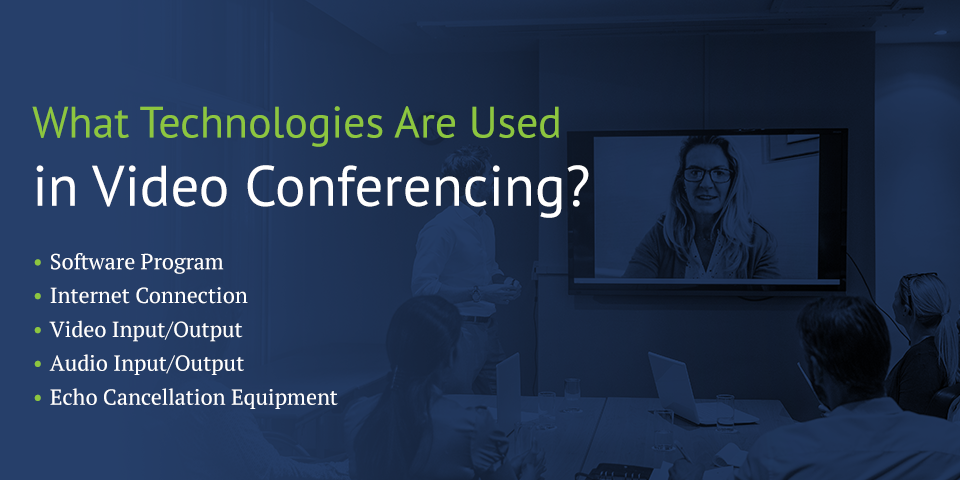
What Technologies Are Used in Video Conferencing?

Video conferencing relies on a variety of different pieces of equipment and technology. A video conferencing system needs to send data to participants, and it needs to create the feeling that the participants are all in the same room, rather than in different locations. Although the exact technology used and the specific equipment required for a video conference can vary slightly based on an organization’s needs, generally speaking, the following are all needed for a video conference to work.

1. Software Program

A software program is usually at the heart of any video conference. Many different programs exist, and each one has its pros and cons. A program that’s right for one company might not be a good fit for another business. For example, some programs allow people to join the video conference using a laptop or other computer or by dialing in from a phone. Many programs limit the number of attendees or participants in the meeting, although some software programs have a more generous allowance than others.

In some cases, the software that powers the video conference is integrated into the hardware. In others, the software is a stand-alone app that works with a variety of devices.

2. Internet Connection

The audio and video need to travel from one person’s device to another person’s device for a video conference to work. One way for the data to travel is over a high-speed internet connection. The prevalence of high-speed internet connections among businesses has made video conferencing a reality for many companies. The faster a company’s internet connection, the more it can do with the video and the better the quality of the video.

3. Video Input/Output

People participating in a video conference need a way to see what goes on and a way to participate in the discussion visually. Video input equipment is usually a camera, such as a webcam attached to a laptop or a stand-alone video camera. In some cases, the video input can be the screen of a computer or digital whiteboard.

Video output equipment includes devices that display the images from the video conference. The equipment can consist of a laptop screen or desktop monitor, a video projector and screen, a television, LCD display or video wall.

4. Audio Input/Output

Like the video, the audio needs to travel in and out as part of the conference. Audio input equipment is often a microphone or a set of microphones. Depending on the setup of the conference, a microphone might be built-in to a laptop or might be a stand-alone piece of equipment. In some conference rooms, microphones are placed throughout the space or centrally located, such as on a table.

Audio output equipment can include speakers, such as those built into a laptop or desktop, a pair of headphones, or a fully integrated audio system with amplifier and speakers throughout the room.

5. Acoustic Echo Cancellation Equipment

A potential drawback of a poorly designed video conference system is the delayed echo that can occur when a person speaking, is heard in the far end system and the speech is picked up and sent back to the originating system. For that reason, echo cancellation technology is often part of a video conferencing program. The technology reduces the delay in the audio so it feels and sounds natural.

technologies used in video conferencing

Room-Based vs. Web-Based Video Conferencing

When you research video conferencing technologies, you will likely come across web-based technology compared to room-based technology. One way to understand the difference between web-based and room-based video conferencing is that one method is software dependent while the other is hardware dependent. Many video conferencing platforms can utilize both web-based and room-based systems.

If an organization is going to use web-based video conferencing, anyone participating in the meeting, presentation or conference needs to download a software program to their computer or smartphone. The software program uses the built-in hardware on a person’s device, such as the microphone, speakers and web camera. Web-based video conferencing is ideal for companies with a lot of remote workers.

Room-based video conferencing is hardware dependent and designed for organizations that plan on hosting video meetings or presentations from a set location. The hardware required for the conferencing system to work is set up in one area, such as a conference room or a designated huddle room.

What Organizations Use Video Conferencing?

If you are wondering why do businesses use video conferencing, it can vary greatly by industry. In some cases, video conferencing has improved the quality of service an organization can provide or has expanded the reach of a company. Here are a few examples of organizations that can use video conferencing and the ways they can use it.

  • Healthcare providers: Healthcare providers can use video conferencing to provide telemedicine. Instead of a patient coming in to see a doctor every time they feel somewhat under the weather, they can schedule a video appointment with their provider. The provider can take their history and review of symptoms to make an accurate diagnosis of what’s going on. Healthcare providers can also use video conferencing to communicate with other members of a patient’s care team.
  • Educational providers: Teachers can use video conferencing to hold open office hours and meetings with their students outside of classroom time. Schools and teachers can also use video conferencing to make classes available to a broader group of students. Instead of requiring in-person meetings, the course can take place virtually, with students logging in to watch their teacher’s lectures and to participate in discussions.
  • Lawyers and courts: Courts often use video conferencing to hear the testimony of a witness who cannot be there in a person. Attorneys can use video conferencing to take depositions or to communicate with other lawyers about a case.
  • Small and medium-sized businesses: More than 40% of employees in the US work at least part of the week remotely. Video conferences give small and medium-sized businesses the chance to hire people who live anywhere in the country and to keep in contact with those employees regularly.
  • Governments: Government agencies can use video conferencing to communicate in times of crisis or for more mundane issues, such as a review of the budget. Video conferencing also allows government agencies to communicate with each other without having to schedule an in-person meeting.

Video conferencing helps with day to day operations

Top Reasons to Use Video Conferencing

No matter what type of organization you work for or run, there’s likely a way to incorporate video conferencing into your operations. Some of the top reasons to use it include:

  • Connecting with distant employees: Video conferences let managers touch base with people who work remotely regularly. Video also allows you to communicate with team members who work in another branch location or who might be on the road for the job.
  • Reaching a wider audience: Video conferences can make classes and educational programming more accessible to more people. For example, schools can create massive online open courses (MOOCs) that students from around the world can sign up for. Professors and instructors can record themselves giving a lecture for students to watch live or on their own time.
  • Providing better service: It can often be more efficient and cost-effective for a company to video conference than to schedule in-person meetings. For example, video meetings allow a doctor to see patients quickly and to reach the bottom of a problem faster.
  • Facilitating communication: It’s often more cost-effective for companies to screen candidates via a phone call rather than have them come in for in-person interviews, at least in the early rounds of a candidate search. Using video meetings can help a manager or search committee see and hear if a candidate is qualified enough to move to the next round.

What Are the Advantages of Video Conferencing?

No matter how you use it, there are many advantages of video conferencing. When you decide whether to use a video conferencing system, it’s a good idea to take a close look at the advantages and disadvantages of holding online meetings and video calls. Among the benefits are:

1. Video Conferencing Offers Greater Flexibility

If you’ve ever tried to schedule a meeting with more than three people and tried to get those people in the same place at the same time, you know the challenge. With video conferencing, it doesn’t matter where meeting participants are located, so you have more flexibility and freedom. If you give a presentation to a large group, you can record it using the conferencing technology and make it available later for people who couldn’t “attend” the live event.

2. Video Conferencing Helps Remote Workers Feel Part of the Team

Although many people who work from home or in remote positions love it, there are some drawbacks to remote work. One of those drawbacks is that people can feel isolated or separated from their co-workers. About one out of every five remote workers said that loneliness was their biggest struggle when working remotely.

Companies that use video conferencing can help their remote employees feel more involved by giving them a chance to see their coworkers and engage with them. Video conferencing offers coworkers who might live in different time zones or different countries the opportunity to speak with each other. Team members can share what they work on and ask their coworkers for advice and support.

helps coworkers collaborate

3. Video Conferencing Can Save Your Company Money

While it does cost money to set up and implement video conferencing technology, in the long run, many organizations using it find that it’s a money-saver or even a money maker. If your company uses online meetings to screen candidates, it doesn’t have to pay to bring candidates in for an in-person interview. Video conferencing also reduces your company’s travel budget as it won’t have to fly in distant remote workers for check-ins or meetings, nor will it have to pay to fly managers out for events.

Since video conferencing often allows an organization to expand the products it offers clients, it can create additional streams of revenue.

4. Video Conferencing Allows You to Hire Anyone, Anywhere

Another advantage of video conferencing is that it can make your company’s applicant pool much bigger. Instead of limiting yourself to local candidates or covering the moving costs and other travel expenses of out-of-town candidates, you can hire workers from wherever. That means you are more likely to attract highly qualified applicants and won’t have to turn people down because they live too far away.

Are There Disadvantages of Video Conferencing?

While there are many benefits and advantages of using video conferencing, there are some potential drawbacks as well. One concern many organizations have when it comes to adding a video conferencing system to their business is the cost of the technology. While there are free options available, many organizations are better served by a paid option. It’s a good idea to evaluate the cost of the technology and to weigh the available options before deciding on a video conferencing system.

How Video Conferencing Can Work for Your Organization

Video conferencing can open new doors for your organization by allowing you to reach a broader audience or helping you better connect with your employees. The most important thing to remember when examining video conferencing technology is to choose a system that works best for you, and that will best meet your organization’s needs. A room-based system might serve you well, or your company might benefit from a web-based system.

Luckily, you aren’t on your own when it comes to implementing a video conferencing system. Morefield Communications’ team of engineers can design a video conferencing solution that meets your specific needs and solves your particular problems. Contact us today to learn more. You can also give us a call at (717) 761-6170.

contact Morefield for video conferencing solutions

Sign Up for Our Newsletter