

Physical security has evolved dramatically over the past decade. Today’s organizations—whether a single-site office or a multi-building campus—face more complex security challenges than ever before and controlling who can get through your doors is no longer as simple as issuing a plastic badge. Modern access control blend hardware, software, the network, and cloud services to create verifiable, traceable, and adaptable security frameworks that protect employees, guests, property, and data.
Beginning with the early years at Morefield where the company was a trusted resource for early wired alarm systems and then continuing to provide thought leadership in building access with systems from IDenticard, Premisys, and Acre | Feenics, Morefield has demonstrated how the right access control plan can tighten security, streamline operations, and help your organization adapt as threats and workflows change.
In the article ahead we share a modern approach to developing an access control plan that fits today’s technology landscape.
Why Access Control Still Matters—Even More Today
While cybersecurity gets most of the headlines, physical access remains a major security risk. Unauthorized entry, tailgating, tenant | department crossover, untracked visitors, and outdated mechanical hardware can compromise sensitive data as easily as a phishing link. A modern access control system can:
- Prevent unauthorized building or room entry
- Track movement in sensitive areas (data centers, HR, finance, healthcare records storage, labs, etc.)
- Generate audit trails for compliance and investigations
- Integrate with video surveillance, intrusion, HR directories, and visitor management
- Support mobile credentials and contactless experiences
- Reduce costs associated with lost keys, rekeying, and manual monitoring
And unlike legacy systems, today’s cloud-enabled platforms allow centralized management and easier scalability across multiple sites. But none of that works well without an access control plan for your building | campus.
Creating a Modern Access Control Plan
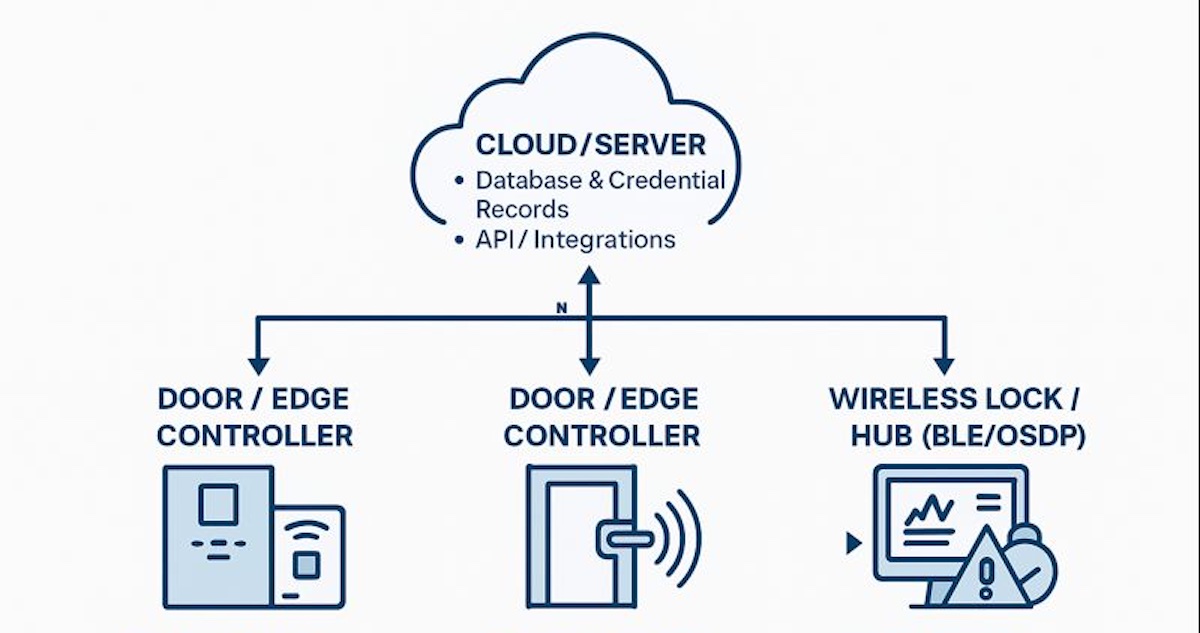
Your access control plan acts as the blueprint for a system that is secure, scalable, compliant, and realistic for the building infrastructure you have today.
A strong plan includes:
- What areas require controlled access
- Which credential technologies you will standardize on
- Where hardware will be placed and how it will be powered
- How you will monitor, maintain, and audit the system
- How the system will expand or integrate with future needs
Below are a few strategies for building an effective plan for today’s office and beyond.
Begin With an Assessment of Your Current access control system
Before selecting hardware or software, you must understand how your existing building security operates—formally and informally. Key questions to ask:
What credential technology are you using?
- Are you still issuing proximity cards?
- Have you adopted smartcards, mobile credentials, or QR-based passes?
- Do you know whether existing badges can be cloned?
Do you have reliable identity lifecycle management?
- Who issues cards or mobile credentials?
- Do deactivated employees still have active cards in your database?
- Are records syncing with HR, Active Directory, or Azure AD?
What is the total cost of your current system? Factor in:
- Licensing
- Server maintenance
- Panel repairs
- Time spent on manual updates
- Rekeying or lockouts
Where are your gaps?
- Unsecured perimeter doors
- Sensitive internal rooms with no audit trail
- Bottlenecks at elevators, turnstiles, or reception
- Unknown visitors or contractors accessing areas freely
The more accurate your assessment, honest answers, the stronger your upgrade path will be.
Observe the Real-World Behavior
Technology alone cannot overcome unsafe habits. Observing the behaviors of employees and guests will indicate where training, signage, or automation (e.g., forced-door alarms, delayed egress, door-held-open alerts) may be needed. During your observation of walk-throughs, look for:
- Tailgating or “holding the door for someone” without verifying credentials
- Propped-open doors (often caused by bad hinges, misaligned latches, or convenience shortcuts)
- Visitors entering without proper check-in or escort
- Card-sharing between shifts or departments
Conduct a Building Survey and Walk Through
This step separates a good installation from a great one. During the walk through consider mechanical and door hardware conditions. Access control is only as strong as the door:
- Loose strike plates
- Damaged frames
- Poorly closing doors
- Non-rated hardware
Any electrified hardware (maglocks, strikes, wireless locks, RIM devices) must match the door’s use case and code requirements. The Building Infrastructure should complement each door with necessary resources for the system to reliably operate;
- Available cabling pathways
- Power availability (PoE, local power supplies, battery backup)
- Network accessibility for controllers or cloud appliances
- Wireless lock RF viability
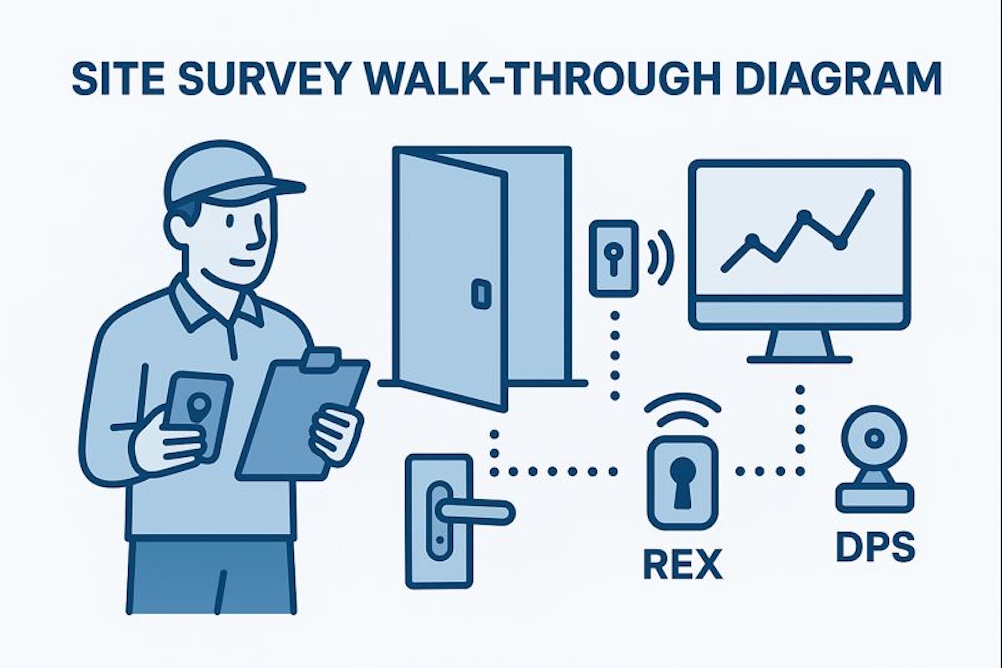
Older buildings may require creative approaches—wireless locks, PoE controllers, or surface-mount solutions.
Finally, understanding the threats | adversaries helps determine whether certain doors need single-factor or multi-factor authentication (PIN + card, card + mobile, etc.). Threat Levels and Asset Value; Identify risks based on:
- Line of your business
- Internal vs. external threats
- Proximity to public access points
- Sensitive rooms storing data, cash, pharmaceuticals, tools, or equipment
- Liability or downtime costs if an asset is compromised
Evaluate Hardware and Credential Options
Today’s systems offer options that didn’t exist a few years ago:
Credential Types
- Encrypted smartcards (DESFire EV2/EV3)
- Mobile credentials (BLE, NFC, wallet-based)
- PIN pads or multi-factor readers
- Biometrics (fingerprint, facial recognition) for high-security zones
- Temporary/visitor QR codes
Reader Technologies
- OSDP secure readers replacing legacy readers
- Multi-technology readers for gradual migration
- Cloud-managed wireless locks for difficult doors
Controller Architectures
- Edge controllers (PoE-powered, one-door units)
- Cloud-native access platforms (Acre Feenics, Brivo, etc.)
- Traditional on-prem panels where required for large campuses
Your access control plan should reflect the mix of technologies appropriate for your infrastructure and security goals.
Ensure Code, Life Safety, and Regulatory Compliance
A compliant installation protects the organization legally and operationally. A modern system must meet:
Life Safety (NFPA 101 | IBC Requirements)
- Egress must always remain safe
- Maglocks must release appropriately (REX, door position, emergency release)
- Delayed egress units must be correctly labeled and timed
ADA Requirements
- Door operators must remain accessible
- Push plate and sensor placement must be correct
- Readers must not obstruct clearances
Industry-Specific Regulations
- HIPAA for healthcare
- CJIS for law enforcement access control
- PCI for financial processing environments
- FERPA for educational institutions
Putting Your Access Control System Plan in Place
Once you’ve created your access control plan, it’s time to install the access control equipment, issue new badges, FOBs, IDs to employees, and address the other gaps identified in your plan. To implement your system properly and efficiently, consider working with Morefield. With more than 80 years of experience, we will provide a proven access control solution tailored to your organization’s needs. To learn more about our physical security services, contact us today.